
VOLT

Precision Volt Offset
1Introduction
VOLT is a performance oriented voltage offset and sum designed to offset 1V/oct signals by single volt increments, both positive and negative. Offset the octave of up to three modules simultaneously.
VOLT is extremely precise. An offset error of ±1mV and a gain error of 0.033% make VOLT the perfect tool for calibrating oscillators.
2Front Panel Overview
- Up / Down Buttons (Gates): Two push buttons that select the offset voltage. Press up to increase the offset by 1V; press down to decrease by 1V. The range is 7V in both the positive and negative directions. Press both simultaneously to return to the reset voltage.
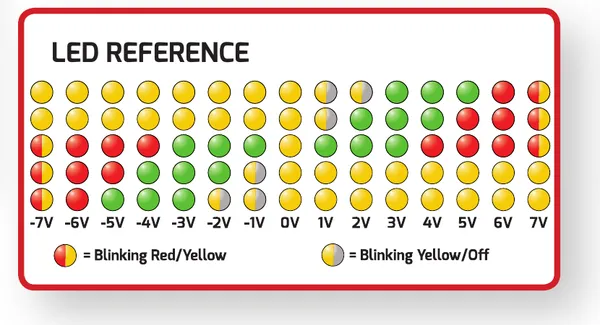
- LED Display: A column of LEDs that shows the current offset voltage, color-coded by voltage range.
- IN A / IN B / IN C: Three CV inputs. Each input is summed with its matching output. 100k ohm input impedance.
- OUT A / OUT B / OUT C: Three outputs. Each output carries its paired input offset by the selected voltage. Compensated impedance buffers, 220 ohm output impedance.
3Inputs and Outputs
Each In/Out pair offsets the incoming voltage by the amount selected on the LED display. Every In/Out pair is identical and is offset by the same voltage, so VOLT can shift the octave of up to three modules at once.
The CV inputs sum with their output. The outputs are compensated impedance buffers capable of driving any load, including multed loads.
4Setting the Offset Voltage
The up and down buttons select the offset voltage applied to every In/Out pair. Press the up button to increase the offset by 1V; press the down button to decrease it by 1V. The range is 7V in both the positive and negative directions. Press both buttons simultaneously to return to the reset voltage.
5Setting the Reset Voltage
Hold both buttons until all LEDs flash red and green to set the reset voltage. All LEDs will then show red to indicate that you are in this mode. Pressing up or down will choose a new reset voltage and display it. Press both buttons again when the desired reset voltage is on the display.
6Reading the LED Display
The LEDs show your current offset voltage. They are color-coded based on the current voltage range. Use the reference below to read the display: each column corresponds to a whole-volt offset from -7V to +7V, and the pattern and color of the lit LEDs indicate the selected value. A split red/yellow LED blinks between red and yellow, and a split yellow/grey LED blinks between yellow and off.
7Precision
VOLT is extremely precise. An offset error of ±1mV and a gain error of 0.033% make VOLT an ideal tool for calibrating oscillators and for accurate octave transposition of 1V/oct pitch signals.
8Specifications
Dimensions:
- Width: 4HP
- Depth: 30mm (with cables)
Power:
- +12V: 34mA
- -12V: 17mA
Inputs:
- Trigger Inputs: 100k ohm impedance
- CV Inputs: 100k ohm impedance, sums with output
Outputs:
- 220 ohm impedance
- 22Vpp range, -7V to +7V offset
- Offset error: ±1mV
- Gain error: 0.033%
9More Information
Visit the VOLT product page for additional resources and support.