
MODBOX MKII
Dual Modulation Oscillator
1Overview
The Modbox MKII is a dual modulation oscillator featuring:
ThreePhase LFO — Three outputs with controllable waveform, frequency and phase spread, plus a phase-modulation mode where each output modulates the phase of the next
Skew LFO — Morphable saw/triangle/ramp waveform. When clock-synced it locks to the tempo as a beat divider/multiplier.
Sample & Hold — Digital S&H with multiple operating modes
Analog Noise — White noise source
2Reading the Panel
The panel silkscreen uses a few label conventions worth knowing — the same terms are used throughout the manual.
Mode buttons (3Φ Mode, S&H Mode): each button cycles three modes, and the outline around each mode's label mirrors that mode's LED, so you can match a label to the LED at a glance:
Regular label — mode 1 (LED off).
Stroked (outlined) label — mode 2 (LED bright).
Dotted border label — mode 3 (LED breathing).
The S&H pattern-length markings (1–32) sit inside a dotted circle — a reminder that pattern length applies only in the Turing Machine mode (S&H mode 3), whose label carries the same dotted border. The dotted styling also matches that mode's breathing LED, so the panel, the label, and the LED all line up. See loop length.
The lock icons around the S&H mode are just a reminder that the sequence can lock into a repeating loop in the Turing Machine mode.
Knob labels: each knob shows two functions.
Bold name — the knob's main (primary) function.
Italic name — its shift function. See Shift Functionality.
LED states used on the panel and in this manual:
- Off LED is dark.
- Dim Steady, low brightness.
- Bright Steady, full brightness.
- Breathing Slowly fades up and down (~0.5 Hz).
- Flash A brief bright pulse on each event.
3ThreePhase LFO
The ThreePhase LFO produces three outputs with controllable waveform, frequency and phase spread, plus a phase-modulation mode where each output modulates the phase of the next. Cycle modes by tapping the 3Φ Mode button.
3.1Modes
| Mode | Name | Mode LED | Description |
|---|---|---|---|
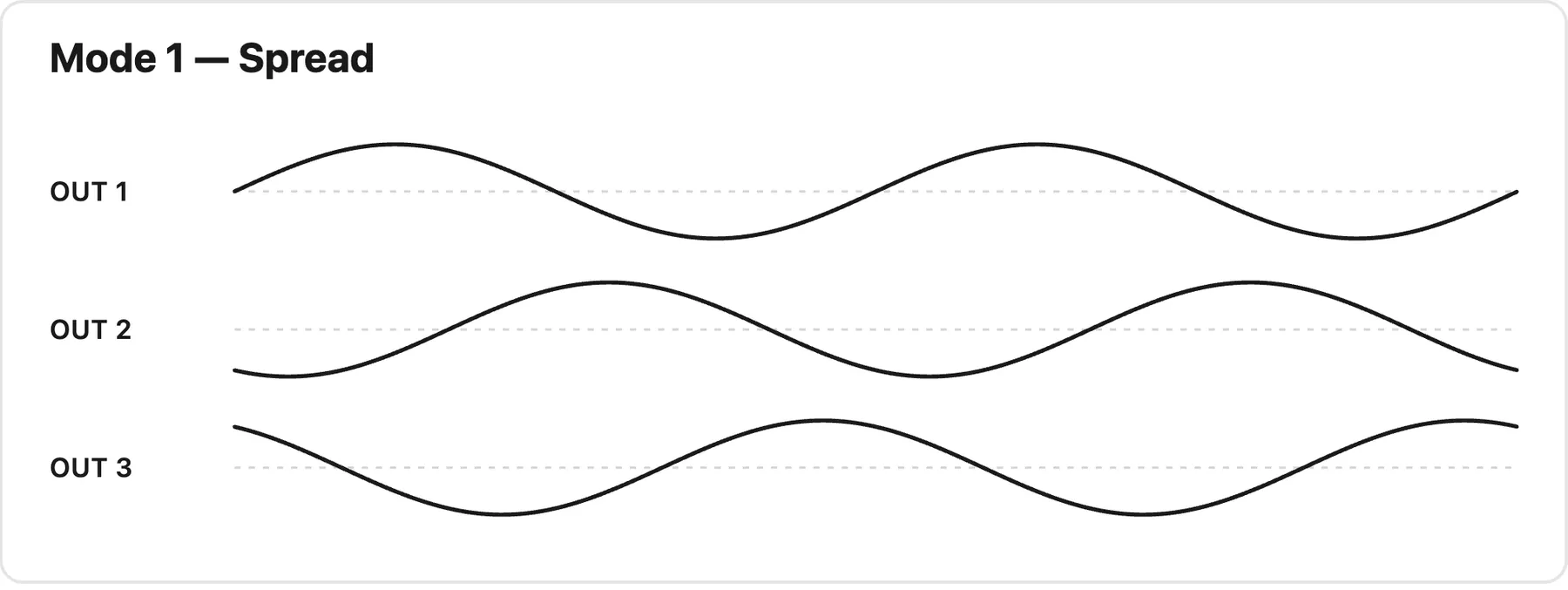
| 1 | Spread | Off | Phase offset controlled by the Spread knob |
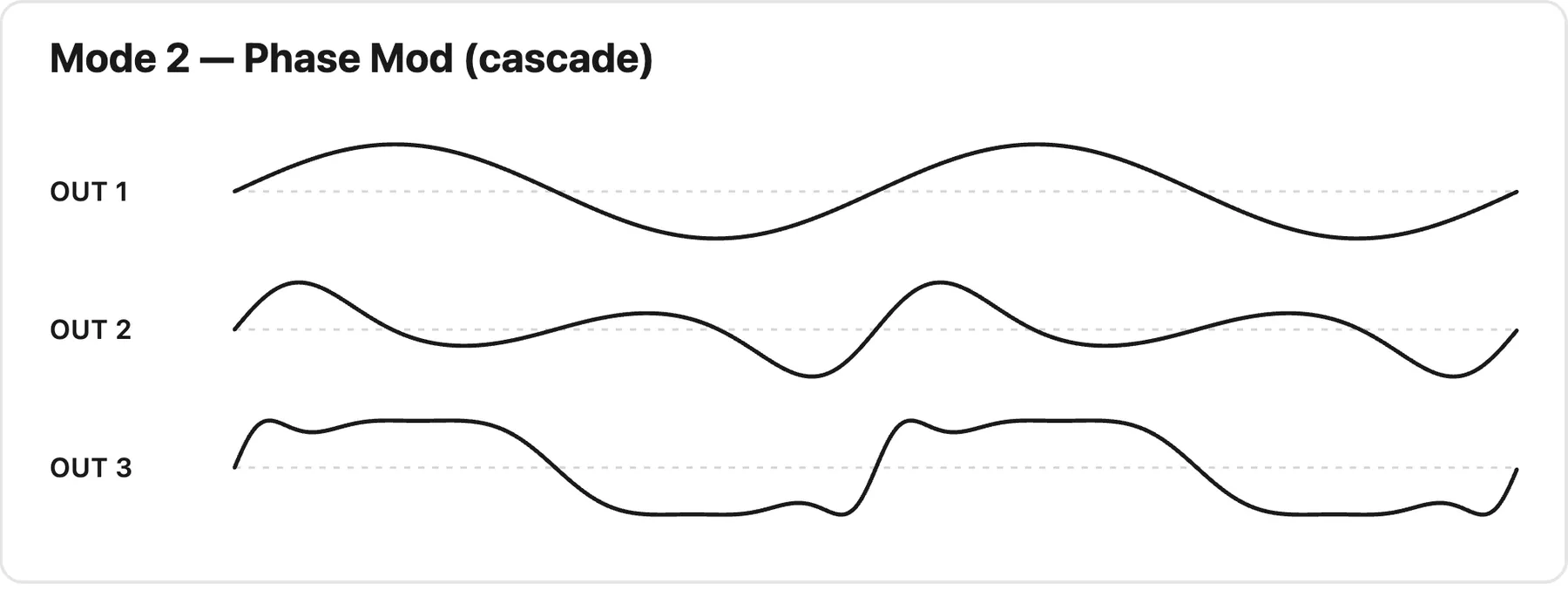
| 2 | Phase Mod | Bright | Phase modulation cascade — each output modulates the phase of the next (1 → 2 → 3), creating harmonic relationships between outputs |
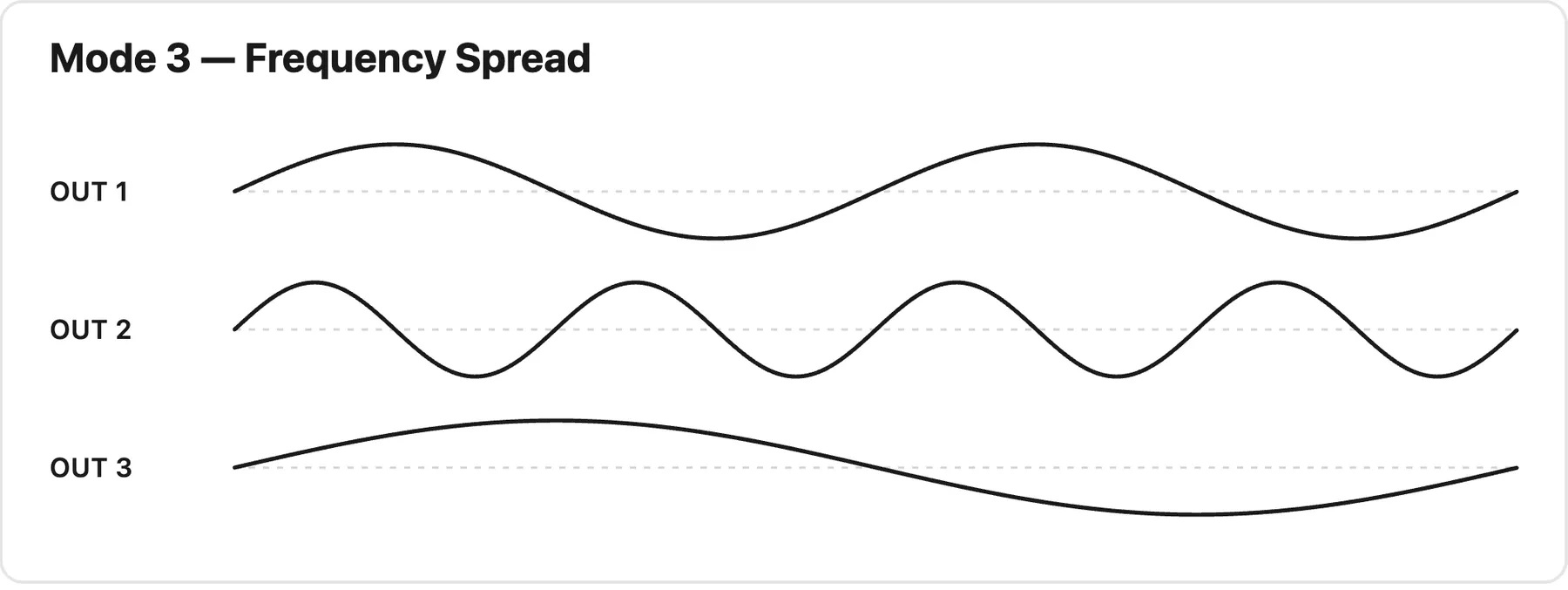
| 3 | Frequency Spread | Breathing (~0.5Hz) | Like Spread, but the Spread knob offsets the frequency of outputs 2 & 3 instead of their phase |
ThreePhase LFO modes and their mode-LED indication.
3.2Mode Behavior
Spread (Phase Offset): Starts at full CCW with all three outputs in phase. Turning CW sweeps the phase offset from 0° to 360°, spreading symmetrically (out2 = −offset, out3 = +offset). Maximum spread (±180°) occurs at the 50% knob position; full CW wraps back to in-phase (360° = 0°).
Phase Mod: Unipolar control over a phase-modulation cascade — each output modulates the phase of the next (output 1 → output 2 → output 3). Full CCW produces no modulation (outputs identical); full CW produces the maximum cascade, building progressively more complex, harmonically related shapes down the chain.
Frequency Spread: Linear 1–8× range. Full CCW puts all outputs at the same frequency and phase; full CW runs output 2 at 8× and output 3 at 1/8× the base frequency.
The three modes at a glance — each diagram shows the three outputs (OUT 1, OUT 2, OUT 3) over the same span of time:
3.3Waveform Control
The 3Φ Wave knob morphs continuously between waveforms, with a dead zone around each pure waveshape that makes them easy to find:
Full CCW: Saw
~10 o'clock: Pure sine (dead zone, centered)
~2 o'clock: Pure triangle (dead zone)
Full CW: Ramp
4Skew LFO
When the Skew LFO is clock-synced (clock mode SKEW or BOTH), the Skew Freq knob stops acting as a free-running frequency control and becomes a beat divider/multiplier, locking the Skew waveform to the clock tempo. In this beat-synced mode the Skew LFO runs at musical divisions of the incoming clock — a different approach from the clock sync on a traditional LFO.
4.1Beat Ratios
The Skew Freq knob sweeps across six anchor ratios relative to the clock:
/8    /4    /2    x1    x2    x4
└─────┴─────┴─────┴─────┴─────┘
full CCW full CW| Knob Zone | Anchor Ratio | Meaning |
|---|---|---|
| Full CCW | /8 | One cycle every 8 clocks (slowest) |
| /4 | One cycle every 4 clocks | |
| /2 | One cycle every 2 clocks | |
| 12 o'clock area | x1 | One cycle per clock |
| x2 | Two cycles per clock | |
| Full CW | x4 | Four cycles per clock (fastest) |
Skew LFO beat-sync anchor ratios across the Skew Freq knob's travel.
4.2Continuous Morphing (not stepped)
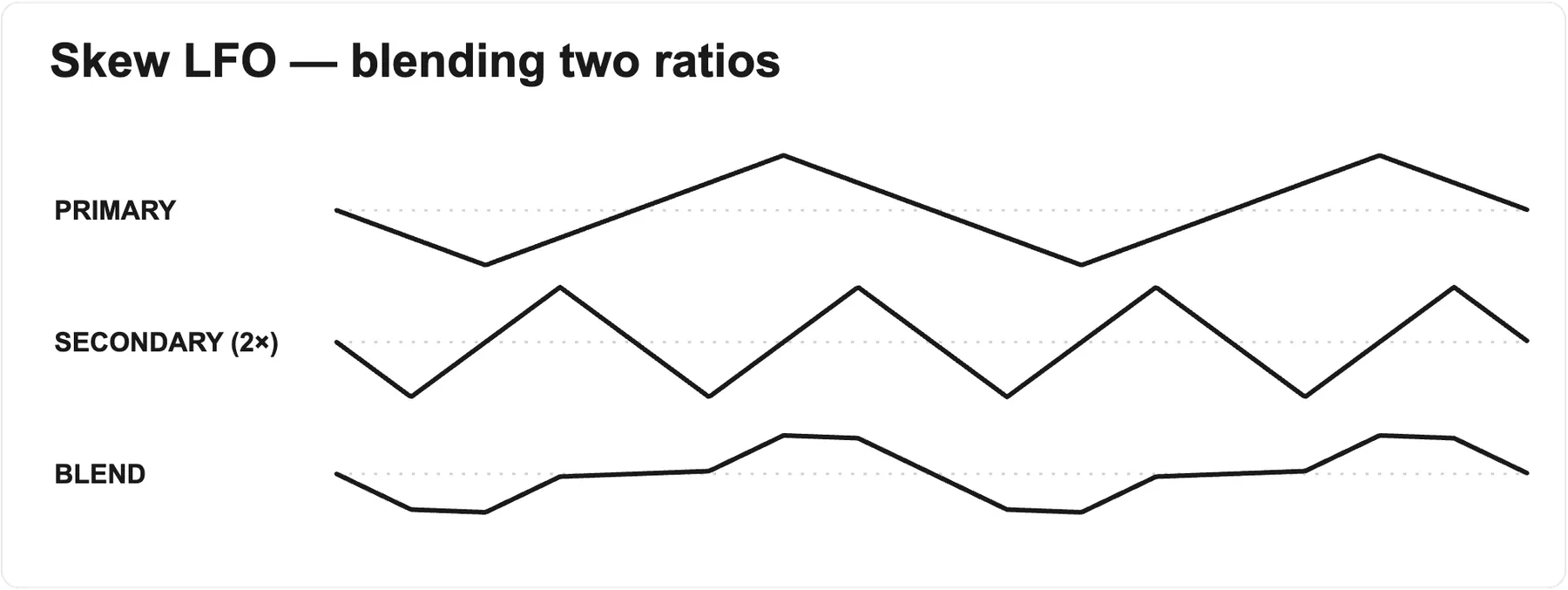
Unlike the synced Freq clock ratios (which jump between 15 discrete integer steps), the Skew LFO crossfades continuously between adjacent anchor ratios as the knob turns. Internally it blends a primary ratio with a secondary one octave higher (2× the primary), weighted by the knob's position within the zone:
At a zone center the output is purely that anchor ratio.
Turning toward the next ratio smoothly morphs the waveform up an octave.
The result is a smooth, sweepable tempo-locked rate that is full of sweet spots with interesting modulations, rather than hard-switched divisions.
4.3Freq CV Jack
The Skew Freq CV jack offsets the ratio selection (±5V maps to roughly ±5 anchor steps). Because the offset is summed with the knob before the morph is computed, CV can smoothly push the Skew LFO across ratio-zone boundaries — including continuous octave-style sweeps under CV control.
4.4Phase Locking
When the ratio or clock tempo changes, the Skew LFO re-aligns its phase to the expected clock position:
Large misalignment (>~40%): snaps immediately (a jump is imperceptible at that error).
Small-to-moderate misalignment: corrects gradually over several control cycles for a glitch-free realignment.
Tiny error (<~0.5%): ignored as noise.
Any phase offset set with the Skew shift function (Skew Freq knob during shift) is honored by the Skew LFO, and the Skew Shape curve still shapes the waveform as normal.
4.5Behavior When the Clock Cable Is Removed
If the clock cable is unplugged while the Skew LFO is beat-synced, it holds the last-known tempo and keeps running. Ratio changes on the Skew Freq knob still work against that remembered tempo, so you can keep dividing/multiplying the last clock rate without a cable patched.
Unplugging the cable does not turn sync off. To go back to a free-running LFO — where the Skew Freq knob sets frequency directly — hold Clock/Reset to set the clock sync mode to NONE.
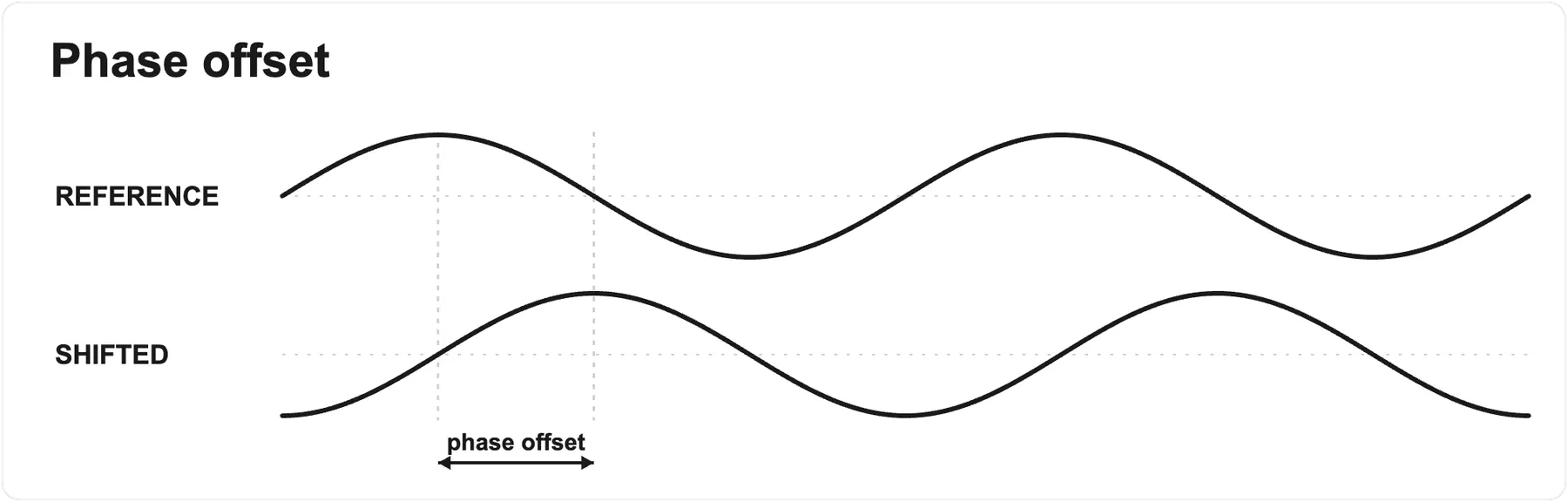
4.6PHASE
While shift is held, the Skew Freq knob becomes the phase offset control, so the beat ratio is frozen at its current value during shift (it does not jump as you turn the knob). The ratio resumes following the knob when shift is released.
This offset applies whether or not the Skew LFO is clock-synced. When it is free-running, the phase offset sets where the waveform restarts from when a Reset is received.
5Sample & Hold
The Sample & Hold is a digital S&H with multiple operating modes. Cycle modes by tapping the S&H Mode button.
The S&H signal in jack is normalled to the module's internal analog noise — the same source as the Noise out jack. With nothing patched, every trigger samples a fresh random voltage (classic random sample & hold). Patching any signal into S&H signal in breaks that normal and samples your signal instead.
5.1Modes
| Mode | Name | Mode LED | Description |
|---|---|---|---|
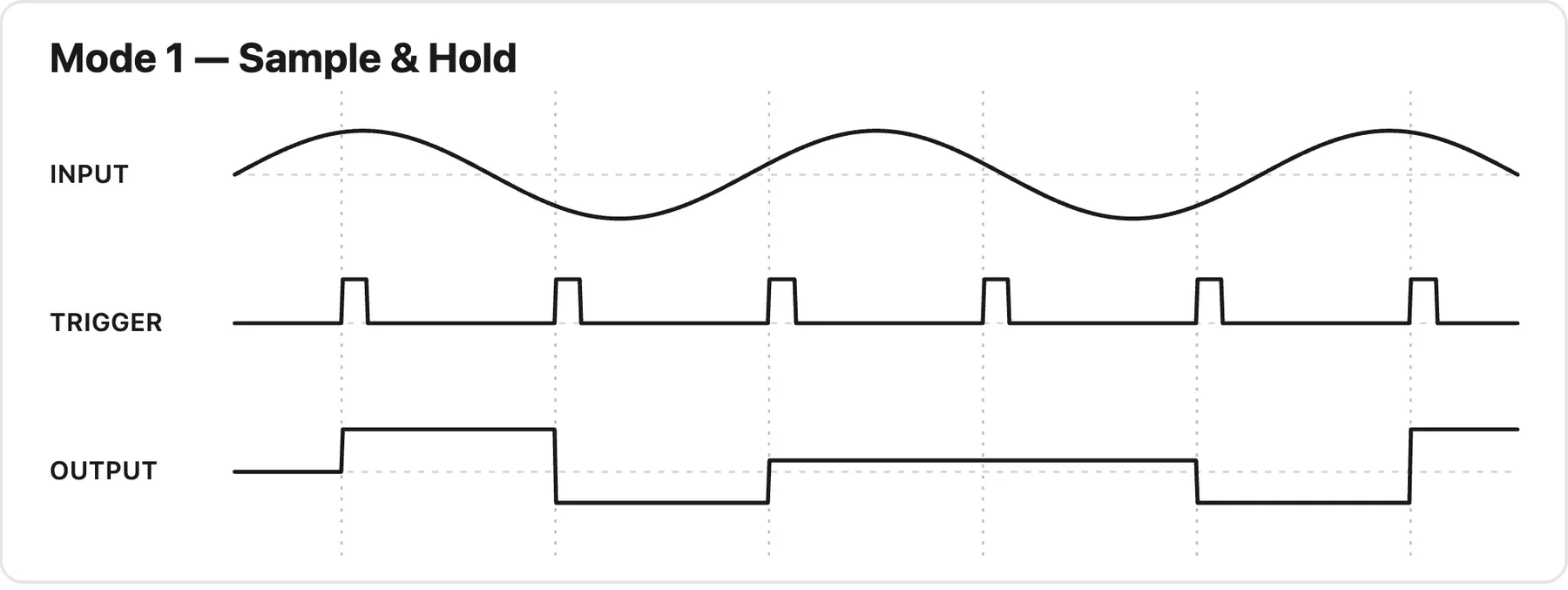
| 1 | Sample & Hold | Off | Classic S&H — samples on rising edge, holds until next trigger |
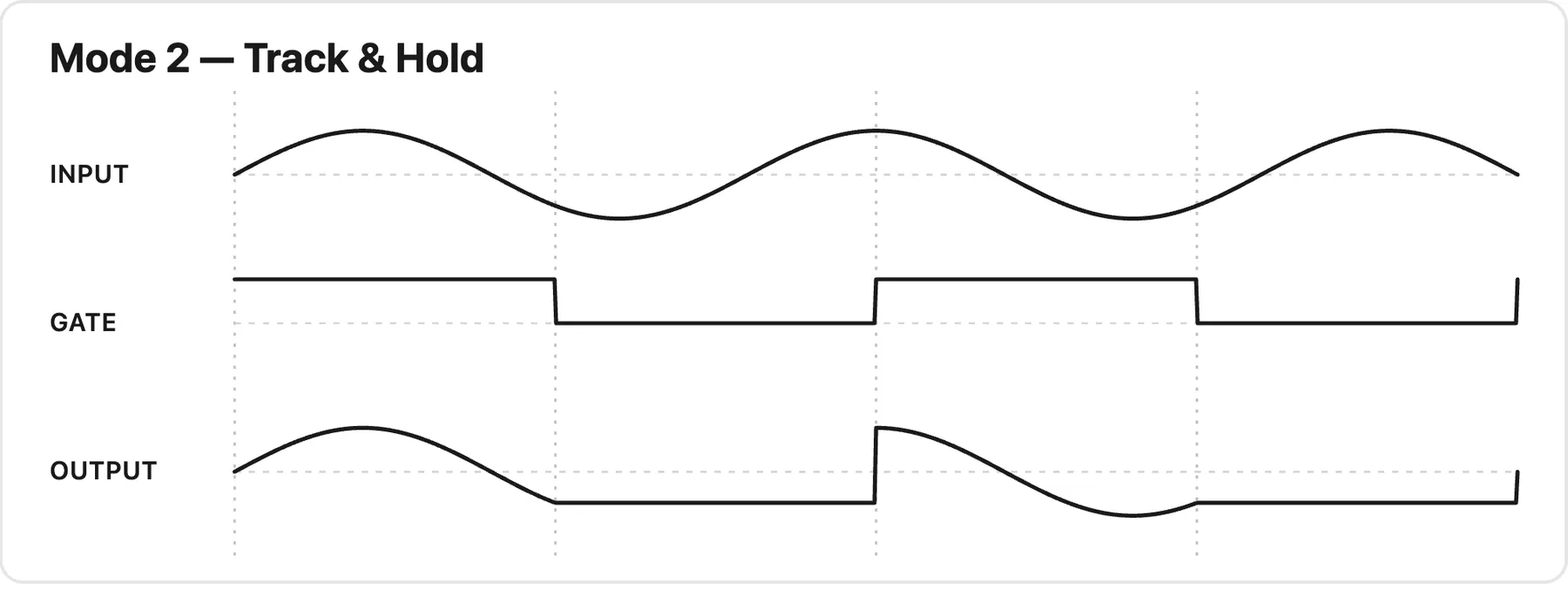
| 2 | Track & Hold | Bright | Gate-based — tracks input while gate high, holds when low |
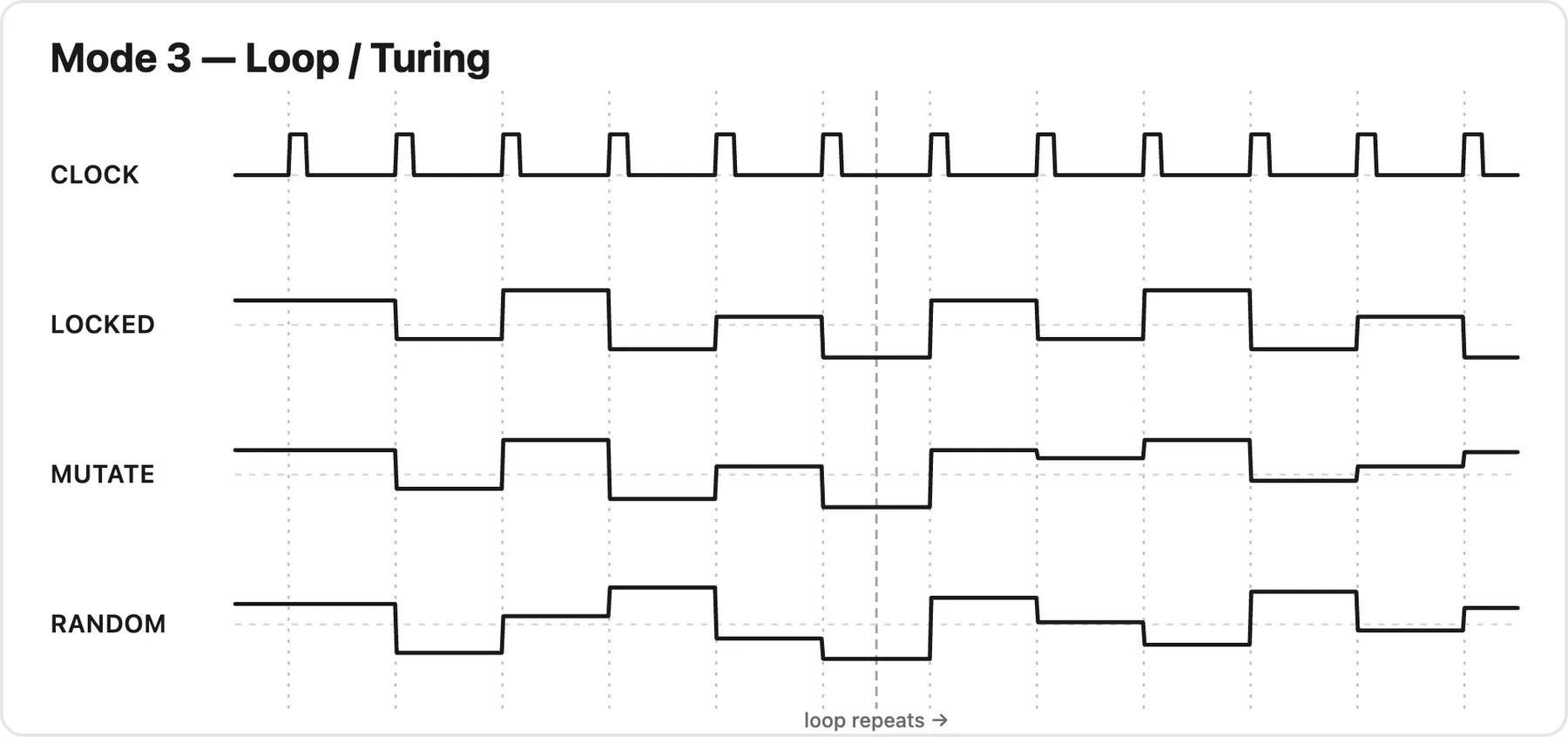
| 3 | Turing Machine | Breathing (~0.5Hz) | Looping probabilistic sequencer with random mutations |
Sample & Hold modes and their mode-LED indication.
How each mode shapes the output — the input, trigger, or gate is shown on top, with the resulting output below:
5.2Triggering
A clock/trigger patched into the SMPL jack drives sampling.
With no cable in the SMPL jack, the trigger is normalled to the Skew LFO valley — the S&H samples once per Skew cycle at the analog low point of the wave.
The SMPL button triggers a manual sample (tap).
5.3Slew / Prob Knob Behavior by Mode
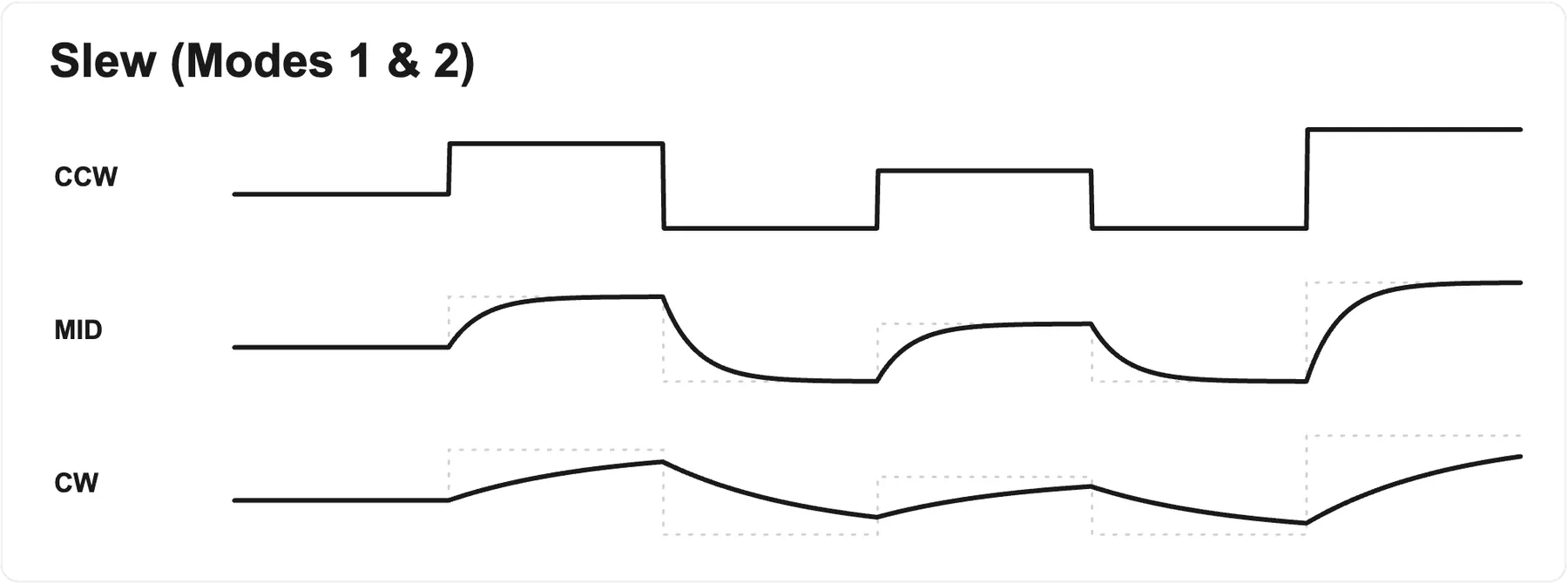
Mode 1 & 2 (S&H / Track & Hold): Sets slew/glide time, from ~0.1 ms (full CCW, near-instant) to ~1.07 s (full CW), exponential response. The knob has no Shift function in these modes.
Mode 3 (Turing Machine): Sets the probability that steps repeat. At center a new value is picked on every trigger; turning clockwise raises the chance a step repeats, until fully CW the sequence locks into a loop. Counter-clockwise does the same but inverts the output voltages. In this mode Shift sets the loop length, 1–32 steps (see table below).
| Knob Position | Behavior | Output |
|---|---|---|
| Full CW | Locked loop | Normal |
| Clockwise of center | Rising chance of repeats | Normal |
| Center (noon) | New value on every trigger | Normal |
| Counter-clockwise of center | Rising chance of repeats | Inverted |
| Full CCW | Locked loop | Inverted |
Mode 3 (Turing Machine) Slew / Prob knob: at center a new value is picked on every trigger. Turning either direction raises the chance a step repeats until the sequence locks into a loop at the extreme; the counter-clockwise half inverts the output voltages.
5.4Loop Length Editing (Mode 3)
Shift is active only in Mode 3. Holding S&H Mode (shift) enters loop-length edit mode for the Turing sequencer:
The Slew / Prob knob sets the loop length while held, from 1 to 32 steps.
The sequence keeps playing during editing, advancing on each SMPL jack trigger (buffer content stays frozen). Shrinking the length wraps smoothly without clicks.
The SMPL button is inactive while shift is held (the ButtonManager tracks one active button at a time) — the expected workflow is a clock patched into the SMPL jack while adjusting loop length.
6Controls
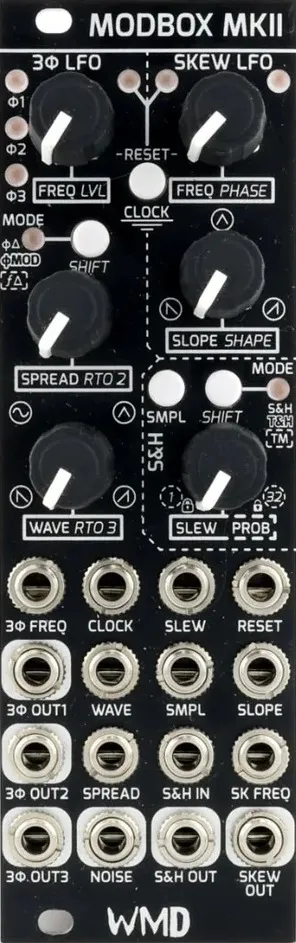
The diagram below labels every control on the panel — each knob, button, and jack. The tables in the following subsections give the full detail.
- 3Φ Freq ThreePhase LFO frequency (0.017–400 Hz). Shift: 3Φ output LEVEL — attenuates all three outputs.
- Clock / Reset Tap: cycle reset mode. Hold: cycle clock sync mode.
- 3Φ Mode Tap: cycle ThreePhase mode. Hold: access shift functions.
- Skew Freq Skew LFO frequency; sets the beat ratio when clock-synced. Shift: Phase offset (0–360°).
- Slope / Shape Morphs the Skew waveform's slope. Shift: Shape curve — exponential / linear / logarithmic.
- 3Φ Spread Phase spread between the three outputs. Shift: Frequency ratio for output 2 (/8 to x8).
- SMPL Manual sample trigger (tap).
- S&H Mode Tap: cycle Sample & Hold mode. Hold: access shift functions.
- 3Φ Wave Waveform morph: Saw → Sine → Triangle → Ramp. Shift: Frequency ratio for output 3 (/8 to x8).
- Slew / Prob Slew/glide time (Modes 1 & 2); repeat probability (Mode 3). Shift: Mode 3: sets loop length, 1–32 steps. No shift in Modes 1 & 2.
- 3Φ Freq CV in CV input for the ThreePhase frequency.
- Clock in External clock input (dedicated CLK jack).
- Slew CV in CV input for Slew / Prob.
- Reset in Reset trigger input (dedicated RESET jack).
- 3Φ Out 1 ThreePhase output Φ1.
- Wave CV in CV input for 3Φ Wave.
- Sample trigger in Trigger input for the Sample & Hold.
- Slope CV in CV input for Slope / Shape.
- 3Φ Out 2 ThreePhase output Φ2.
- Spread CV in CV input for 3Φ Spread.
- S&H signal in Signal sampled by the Sample & Hold. Normalled to internal noise (same source as Noise out) when nothing is patched.
- Skew Freq CV in CV input for Skew Freq.
- 3Φ Out 3 ThreePhase output Φ3.
- Noise out Analog white-noise output.
- S&H out Sample & Hold output.
- Skew out Skew LFO output.
6.1Knobs
| Knob | Normal Function | Shift Function | Range |
|---|---|---|---|
| 3Φ Freq | ThreePhase LFO frequency | 3Φ output LEVEL (attenuates all three outputs) | 0.017–400 Hz |
| 3Φ Spread | Phase spread between outputs | Frequency ratio for output 2 (/8–x8) | 0–1.0 (in-phase → max spread) |
| 3Φ Wave | Waveform morph | Frequency ratio for output 3 (/8–x8) | Saw → Sine → Triangle → Ramp |
| Skew Freq | Skew LFO frequency | Phase offset (0–360°) | 0.017–400 Hz |
| Slope | Ramp slope/morphing | Shape curve (exp/lin/log) | 0–1.0 (fast rise → slow rise) |
| Slew / Prob | Slew time (Modes 1 & 2) / repeat probability (Mode 3) | Mode 3: loop length (1–32 steps) | 0–1.0 |
Knobs and their normal and shift functions.
6.2Buttons
| Button | Location | Tap (under 500ms) | Hold (500ms or more) |
|---|---|---|---|
| 3Φ Mode | Top left | Cycle 3Φ LFO mode | Hold for shift functions |
| Clock/Reset | Top right | Cycle reset mode | Cycle clock sync mode |
| SMPL | Bottom left | Trigger sample capture | — |
| S&H Mode | Bottom right | Cycle S&H mode | Hold for shift functions |
Button locations and their tap vs. hold actions.
6.3Changing Operating Modes
Tap 3Φ Mode to cycle ThreePhase modes (1→2→3→1).
Tap S&H Mode to cycle Sample & Hold modes (1→2→3→1).
7Clock Synchronization
7.1Clock Sync Mode
Cycle modes by holding the Clock/Reset button. Clock signals are patched into the dedicated CLK jack. Modes can be cycled with or without a cable: when no cable is present, the current LFO frequency becomes a "virtual clock" that the freq knob divides/multiplies.
| Mode | Oscillators synced |
|---|---|
| NONE | Neither (both run freely at knob-set frequencies) |
| SKEW | Skew LFO only |
| THREEPHASE | ThreePhase LFO only |
| BOTH | Both LFOs |
Clock sync modes (CLK jack).
7.2Reset Mode
Cycle modes by tapping the Clock/Reset button. Reset triggers are patched into the dedicated RESET jack.
| Mode | Oscillators reset |
|---|---|
| NONE | Neither |
| SKEW | Skew LFO resets phase on trigger |
| THREEPHASE | ThreePhase LFO resets phase on trigger |
| BOTH | Both LFOs reset phase on trigger |
Reset modes (RESET jack).
7.3Clock Ratios
When synced, the Freq knobs select from 15 symmetric integer clock ratios:
/8  /7  /6  /5  /4  /3  /2  x1  x2  x3  x4  x5  x6  x7  x8
                            ^
                        12 o'clock
                        (x1 dead zone)
The Freq CV jack provides V/Oct control: ~10 octaves over the knob range, freely multiplying/dividing the base frequency in free-running mode (no clamping), and offsetting ratio selection when synced. There is no dead zone around 0V.
7.4Setting Up Clock Sync
Patch the clock signal to the CLK jack.
Hold Clock/Reset to cycle to the desired clock sync mode.
Use the Freq knob to select the clock ratio (/8 … x8).
7.5Enabling Phase Reset
Patch a trigger to the RESET jack.
Tap Clock/Reset to cycle to the desired reset mode.
The selected LFO(s) reset to 0° phase on each trigger.
8Shift Functionality
Holding either the 3Φ Mode or S&H Mode button (500ms or more) enables the shift functions for both LFOs at once. While the button is held, certain knobs control alternate parameters.
Each knob's shift function is labeled in italics on the panel.
8.1Adjusting Shift Parameters
Hold 3Φ Mode or S&H Mode.
Move the desired knob past its entry position (takeup).
Adjust to the desired value.
Release the button (values are saved to memory ~60 seconds after the last change).
8.2Knob Takeup Behavior
When you hold or release the shift button, knobs use "takeup" detection to prevent value jumps:
The knob's position is recorded when mode changes.
The knob must return near that position before the new function activates.
This ensures smooth transitions without parameter jumps.
If a knob is already at its entry position, takeup engages immediately.
Animation: the knob's indicator turns until it lines up with the recorded takeup position marked above it; when they meet, the marker fades away as the new function engages. The sequence then repeats.
8.33Φ Spread/Wave Shift Ratios
The 3Φ Spread and 3Φ Wave knobs, while shift is held, use the same 15 symmetric integer clock ratios as the synced Freq knob:
/8  /7  /6  /5  /4  /3  /2  x1  x2  x3  x4  x5  x6  x7  x8
                            ^
                        12 o'clock
                        (dead zone, default = unity)
12 o'clock (x1): Unity — output runs at same frequency as output 1 (default; a dead zone around unity makes it easy to find)
Full CCW (/8): Output runs at 1/8 the master frequency
Full CW (x8): Output runs at 8x the master frequency
The Freq CV jack offsets the selected ratio (V/Oct).
8.4Setting the 3Φ Output Level
The three ThreePhase outputs share a single output level that you can attenuate to best suit your musical purpose — turn it down for gentler, more subtle modulation, or leave it at full for the strongest effect. To set it:
Hold 3Φ Mode (or S&H Mode).
Turn 3Φ Freq: full CCW = silent, full CW = unity.
At full CCW (silent) the 3Φ LEDs flash "WMD" in Morse to confirm the outputs are off.
8.5Output Range (Bipolar / Unipolar)
Holding both mode (shift) buttons together (500ms or more) enters a dedicated output-range mode. While both are held, all other shift edits are suspended and the Freq knobs set each oscillator's output range independently:
| Knob | Sets | Fully CCW | Fully CW |
|---|---|---|---|
| 3Φ Freq | 3Φ output range | BIPOLAR (±5V) | UNIPOLAR (0 to +5V) |
| Skew Freq | Skew output range | BIPOLAR (±5V) | UNIPOLAR (0 to +5V) |
Output range set with the Freq knobs while both mode (shift) buttons are held.
Only the ends of each Freq knob set the range: turn fully CCW for BIPOLAR, fully CW for UNIPOLAR. Anywhere in between leaves the current setting unchanged.
Each oscillator's range is independent and saved to memory.
Default is BIPOLAR for both oscillators.
When set to UNIPOLAR, a level of 0 (via 3Φ shift LEVEL) still outputs a clean 0V.
To set it: hold both mode (shift) buttons together (500ms or more), then turn 3Φ Freq (for the 3Φ oscillator) or Skew Freq (for Skew) into the lower 25% (BIPOLAR) or upper 25% (UNIPOLAR).
8.6Resetting Settings
To reset all shift parameters to defaults: hold a mode button past the 500ms shift threshold, then press the Clock/Reset button.
Resets shift settings: 3Φ level → full, output ranges → BIPOLAR, phase offsets → 0°, freq ratios → x1.
Operating modes are preserved (3Φ mode, S&H mode, clock mode, reset mode are untouched).
8.6.1Full Reset (Modes + Shift Settings)
To reset operating modes and shift parameters to defaults: hold both mode buttons for half a second, then press the Clock/Reset button.
Resets operating modes: 3P mode → Mode 1 (Spread), S&H mode → Mode 1 (SAMPLE_HOLD), clock mode → NONE, reset mode → NONE.
Also resets every shift setting listed above.
9LED Indicators
LED states used throughout this section:
- Off LED is dark.
- Dim Steady, low brightness.
- Bright Steady, full brightness.
- Breathing Slowly fades up and down (~0.5 Hz).
- Flash A brief bright pulse on each event.
9.1Mode LEDs
| LED | Mode 1 | Mode 2 | Mode 3 |
|---|---|---|---|
| 3Φ Mode | Off | Bright | Breathing |
| S&H Mode | Off | Bright | Breathing |
Mode-LED states for each operating mode.
9.2Sync LEDs (per-oscillator)
Each sync LED reflects its own oscillator's combined clock + reset state — Left = ThreePhase, Right = Skew:
| LED State | Meaning |
|---|---|
| Off | Oscillator not clock-synced and not reset-enabled |
| Dim | Oscillator is clock-synced |
| Bright | Oscillator is reset-enabled |
| Breathing | Oscillator is both clock-synced and reset-enabled |
| Flash | On each clock pulse (if synced) and each reset trigger (if reset-enabled) |
Per-oscillator sync-LED states.
9.3Output Level LEDs
| LED | Function |
|---|---|
| 3Φ1, 3Φ2, 3Φ3 | ThreePhase output — real-time brightness, brighter as output voltage rises. The overall brightness also dims as the 3Φ LEVEL is lowered. |
ThreePhase output-level LEDs.
10Specifications
Physical:
- Width: 8 HP
- Depth: 38mm (with cables)
Power:
- +12V: 55 mA
- −12V: 10 mA
Outputs:
- Oscillator outputs: −5V to +5V, 1kΩ, 12-bit, 48 kHz
- S&H output: −5.1V to +5.1V, 1kΩ, 12-bit, 48 kHz
Inputs:
- CV inputs: −5V to +5V, 100kΩ (decoupled from the knobs)
- Gate / Reset / SMPL: 100kΩ, 2V Schmitt trigger
- S&H input: −5.05V to +5.05V, 102kΩ, 12-bit, 40 kHz
Ratios:
- 3Φ LFO: /8 to x8 (x1 at center)
- Clock: /512 to x4
Firmware:
- Field-updatable firmware
- Saves settings after 1 minute of Shift/Mode inactivity
11Note from the designer
Placeholder — the designer's note will go here.