
Fracture
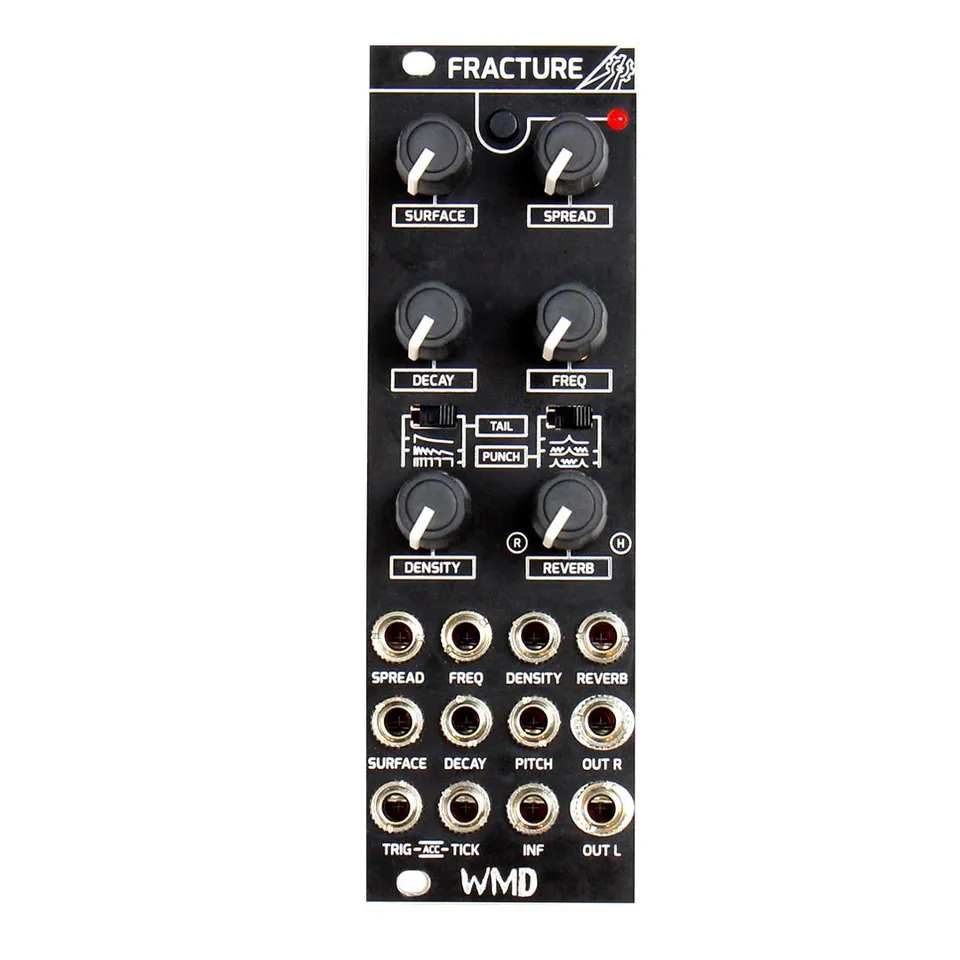
Multi-Particle Percussion Synthesizer
1Introduction
Originally inspired by audience applause, Fracture is a multi-particle percussion synthesizer that applies concepts from traditional analog clap circuits to granular synthesis methods.
We distilled our favorite clap circuits down to the basic concept of repeating noise impulses. Pushing this idea into the realm of granular sampling synthesis resulted in an engine based on a pseudorandom particle oscillator that triggers the most available voice of a 22 voice sample player. The frequency of the particle oscillator and its likelihood that it will trigger a sample is modulated to create bursts of micro samples in which the parameters for each voice, sample, pitch, amplitude, and pan are assigned by pseudorandom generators seeded by the CV inputs.
Our goal was to design a clap percussion module covering the range from classic drum machine claps all the way to full audience applause. We ended up with a module that encompasses a huge range of timbres beyond claps. We hope this engine provides you with the tools to intuitively create wild percussion sounds that bring your system to life in a new way.
2Front Panel Overview
![Front panel diagram of Fracture. Top: SURFACE and SPREAD knobs flanking a button and LED. Second row: DECAY and FREQ knobs. Middle: a TAIL switch with three waveform mode icons on the left and a PUNCH switch with three waveform mode icons on the right. Third row: DENSITY and REVERB knobs, with R and H labels marking the Room and Hall ends of the REVERB knob. Bottom three jack rows, left to right: SPREAD, FREQ, DENSITY, REVERB; then SURFACE, DECAY, PITCH, OUT R; then TRIG-[ACC]-TICK, INF, and OUT L.](/_astro/front-panel-diagram.XNBavWYB_ZbKUu6.webp)
3Controls
- SURFACE:
- Fracture features 23 particle types we call surfaces. The SURFACE control covers a broad range of sonic territory by including surfaces like drum sticks, ping pong balls, toggle switches, claps, snaps, and other ear tickling transient microsamples.
- DENSITY:
- Increases the rate of the particle production oscillator. More particles will attempt to be produced as the density is increased.
- DECAY:
- Controls the length of the particle burst produced when Fracture is triggered. Combine the DECAY knob with the TAIL switch to dial in bursts ranging from dense crescendos to loose applause from the sloppiest crowds.
- FREQ:
- Dependent on the setting of the PUNCH switch, FREQ changes the overall spectrum and/or frequency of the produced particle burst.
- SPREAD:
- As SPREAD is increased the particles are assigned pitches and panning with greater variance from the center.
- REVERB:
- Add Room or Hall reverb. The knob sweeps from Room (R) to Hall (H). Modulate after triggering for late reverb tails.
4Mode Switches
TAIL works alongside DECAY by routing the decay envelope to different parameters of Fracture's internal engine. The switch has three positions (top, middle, bottom), each marked with a waveform icon on the panel:
First mode (top): modulates the amplitude of the burst particles. Particles are produced at a constant rate and the decay envelope reduces their individual volumes one by one.
Second mode (middle): modulates amplitude like the previous mode while additionally modulating the likelihood that a particle will be produced. Particles are less likely to sound as the envelope decays with time. This mode results in particle bursts that are tight and punchy while also including gently decaying tail particles.
Third mode (bottom): modulates the particle probability exclusively. Particles have a semi-random amplitude and are less likely to be produced as the envelope decays with time.
PUNCH also has three positions, each marked with a waveform icon on the panel:
First mode (top): places a fixed resonance bandpass filter after the particle engine. FREQ controls the center frequency of the bandpass filter.
Second mode (middle): adds simultaneous pitch control to the FREQ knob. Changing FREQ will move the center frequency of the bandpass filter and the center pitch of the particle burst.
Third mode (bottom): simultaneously modulates the filter and pitch, but changes the filter to a parallel bandpass. This setting is great for adding some more punch to your particle burst.
5Inputs and Outputs
Each knob has a matching CV input jack (SURFACE, SPREAD, DECAY, FREQ, DENSITY, REVERB) that sums with the knob setting. The remaining jacks handle triggering, pitch, infinite mode, and the stereo outputs.
- TRIG / [ACC] / TICK:
- Trigger, Accent, Tick. Sending a trigger into TRIG starts a particle burst. A louder, longer, accented particle burst is played if tick is high when the TRIG event occurs. Send a trigger into TICK to play a single particle sample on the rising edge.
- PITCH:
- Use this jack to take control of the center pitch of the particle burst while disabling any control the FREQ knob has over the pitch.
- INF (Infinite):
- Disable the decay envelope and freely produce particles. DECAY directly controls the parameter the envelope would have controlled as set by the TAIL switch. No particles are produced when DECAY is at its minimum. Triggering or pressing the button modulates density, giving the impression of a particle burst within an infinite particle cloud.
- OUT L & OUT R:
- Fracture is true stereo. Don't have a stereo input on your destination? No problem — just use OUT L for mono operation.
6Specifications
Dimensions:
- Size: 8HP
- Depth: 38mm (with cables)
Power:
- +12V: 61mA
- -12V: 17mA
Inputs:
- All CV Inputs: 100k ohm impedance. CV inputs sum with knobs. Full sweep is 5V.
- Gate Inputs: 100k ohm impedance. 2V threshold Schmitt Trigger.
Outputs:
- Audio Output: 220 ohm impedance. 20Vpp range. 1.0ms latency max.
7More Information
Visit the Fracture product page for demos, sound examples, and the latest information.