
Cosmic Debris
Delay and Reverb Processor
1Introduction
Cosmic Debris is a Eurorack module designed with live performance in mind. It is a delay and reverb effect meant to be played and adjusted in real time, like an instrument.
At its core, Cosmic Debris features stereo input and output with a network of 16 individual delay lines, each with inline filtering and multiple feedback routing options. Three distinct modes provide different sonic territories: tight rhythmic delays, expansive ambient textures, and pitch-shifted shimmers. It is a true stereo delay effect with features designed for performance, by performers.
Slew limiting on time-based parameters means you can quickly turn a knob and immediately move on to other modules. The delay time continues to shift smoothly in the background, creating sweeping doppler shift effects without requiring constant attention.
The SNAPSHOT function lets you save a reference point. Push the module into chaos for a riser or transition, then snap back instantly with no menu diving and no panic.
The SPRAY parameter morphs delay line lengths in real time. Rhythmic delays dissolve into lush reverb. Dense reverb collapses back into tight, syncopated echoes. It is instant delay-to-reverb morphing that responds to your performance.
2Controls
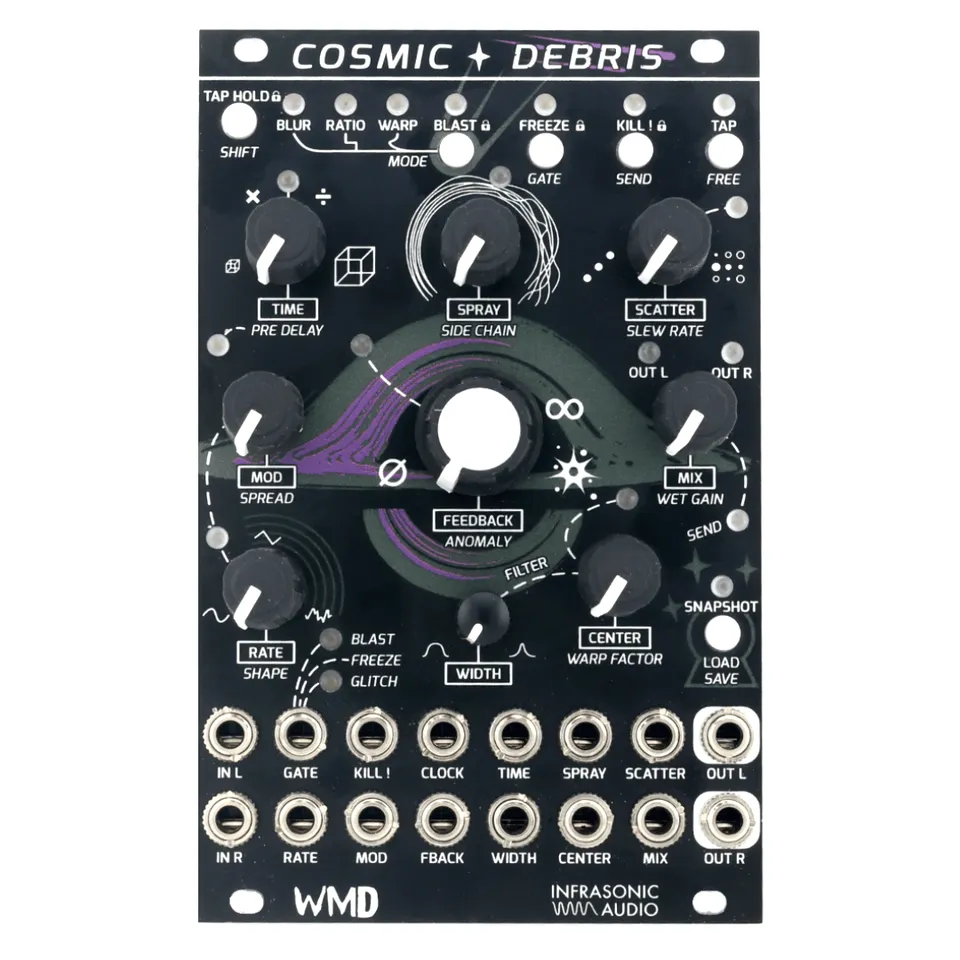
Knobs, buttons and jacks are labeled in all capitals (for example, TIME). SHIFT parameters are the secondary functions printed in italics on the panel and are also written in all capitals throughout this manual.
All knobs use soft takeover: the knob position must match the parameter value before changes take effect. A red flashing LED means the knob position does not match; keep turning until the flashing stops. When stationary, LED brightness shows the current parameter value, brighter meaning higher and dimmer meaning lower.
2.1Buttons
- SHIFT: Hold to enable the SHIFT (italic) functions on knobs and buttons. SHIFT is momentary, so it must remain held while using shift functions. Quickly tap and release, then press and hold SHIFT to enable and disable the lock function of BLAST, FREEZE and KILL.
- BLAST: Momentary (default) boost to input gain with soft saturation, feedback and send boost. Behavior can be set to toggle with the lock function. SHIFT: MODE changes between BLUR, RATIO and WARP modes.
- FREEZE: Momentarily (default) mutes the input to the delay lines and sets feedback to infinite. Bypasses filters, modulation and pitch shifters (WARP) while active. SHIFT: GATE changes the behavior of the GATE input jack.
- KILL: Clears all delay buffers with a click-less fade. Action is on release. Hint: hold KILL and change settings or load a snapshot for an instant change to a new setting. SHIFT: SEND enables SEND mode; the SEND LED next to the MIX knob lights red to indicate send mode is active. In send mode, MIX becomes send level, allowing for tails to continue after the MIX knob is turned down.
- TAP: Tap tempo for delay time. An external clock at the CLOCK jack will override Tap Tempo. SHIFT: FREE disables clock sync, turning time into a continuous control, indicated by a slow glowing blue LED above TAP.
2.2Knobs
- TIME: Direct control over the length of all delay lines. CCW gives faster, shorter delay times and smaller virtual spaces; CW gives slower, longer delay times and larger virtual spaces. SHIFT: PRE DELAY adds a delay to the input signal before it reaches the delay lines. The TIME CV input is a bipolar control over TIME, summed with the knob and inverted from knob behavior so higher voltage equals faster time.
- SPRAY: Changes the relative lengths of all delay lines in the network. SHIFT: SIDE CHAIN ducks the wet signal to the input signal, allowing the input signal to be unaffected and the wet signal to come up in level when input is not present. See the Modes and Spray section for more.
- SCATTER: Changes delay feedback routing. CCW: all lines feed back into themselves. CW: delay lines feed into each other. SHIFT: SLEW RATE. A blue LED indicates crossfade mode; changes to TIME and SPRAY will be crossfaded with no modulation artifacts. An orange LED that gets brighter further CW indicates a slew is being applied to TIME and SPRAY, slowing the time it takes to reach a new setting and creating a doppler shift effect.
- MOD: Controls the amount of LFO modulating delay time for all 16 delay lines. SHIFT: SPREAD pushes the 16 LFOs out of phase from each other for more textured modulation; CCW keeps the LFO phase the same on all delay lines, CW spreads the LFO phase fully across all the delay lines.
- RATE: Controls the speed of the MOD LFO. SHIFT: SHAPE changes the shape of the MOD LFO from Sine, to Triangle, to a smooth random waveform with continuous crossfading between shapes.
- FEEDBACK: Controls the amount of feedback in the delay network. Fully CCW (slashed-zero symbol): no feedback. Center (infinity symbol): stable 100% feedback with no added gain. Fully CW (burst symbol): adds gain into the feedback network for an explosive growth in feedback. SHIFT: ANOMALY adds bit reduction and pitched buffer stutters into the delay network for a lo-fi, glitchy effect.
- MIX: Dry/Wet mix for the final outputs stage. In SEND mode it becomes the send level. SHIFT: WET GAIN is a direct adjustment of the final level of the summed delay line outputs.
- CENTER: Frequency control for the 16 variable width bandpass filters placed after each delay line, before the feedback paths. SHIFT: WARP FACTOR is the pitch control for the pitch shifters in WARP mode, ranging from -1 octave to +1 octave; knob moves in semitones.
- WIDTH: Adjusts the bandwidth of the variable bandpass filter. At 0% WIDTH and with CENTER at 50%, no audible filtering is applied.
2.3Gate Input Modes
The GATE input behavior is selected with SHIFT + GATE. A signal high at the GATE input triggers one of the following:
FREEZE: Signal high enables FREEZE.
BLAST: Signal high enables BLAST.
GLITCH: Signal high forces stuttering via short, pitched buffer loops.
3Signal Routing
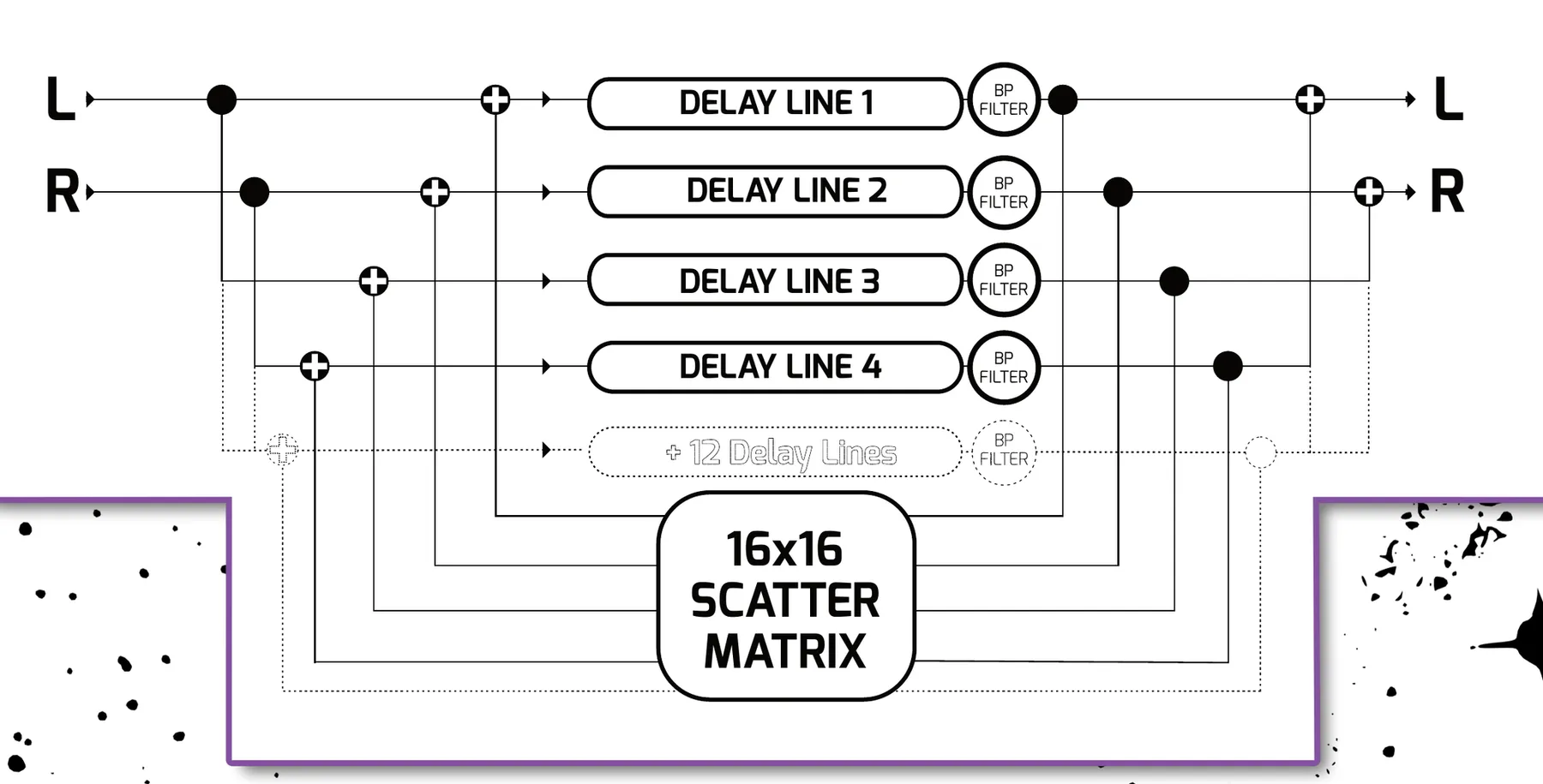
Input: Stereo input with left normalled to right. When only the left input is used, the signal is automatically copied to the right input channel.
Output: Stereo output with intelligent routing. When only the left output is used, the final output signal (both dry and wet) is summed to mono through the left output jack.
When signals enter the module, the left and right channels are split and routed to the delay lines in an alternating pattern: the left input feeds odd-numbered delay lines (1, 3, 5, 7, and so on) while the right input feeds even-numbered delay lines (2, 4, 6, 8, and so on).
The FEEDBACK and SCATTER controls determine how these delay lines interact with each other. With SCATTER at minimum, each delay line simply feeds back into itself, creating straightforward delay repeats. As you increase SCATTER, the outputs of the delay lines are routed through a matrix that sends them into different delay lines at varying levels. This creates complex interactions between the delays, resulting in evolving, spacious textures and interesting stereo movement.
Finally, the outputs of all delay lines are routed through independent bandpass filters before being recombined and sent to the audio outputs using the same alternating pattern: odd-numbered delay lines sum to the left output, even-numbered delay lines sum to the right output.
4Modes and Spray
Cosmic Debris has three different modes of operation. These modes mostly address how the SPRAY control functions and the default settings when SPRAY and SCATTER are both at 0%. Each mode affects the delay network for different sounds and textures at different positions. Mode selection is saved with SNAPSHOT and can be changed while holding KILL, so you can cue up a change from one mode to another while clearing all delay buffers upon release of the KILL button.
Mode selection: to switch between modes, hold SHIFT and press MODE.
4.1BLUR
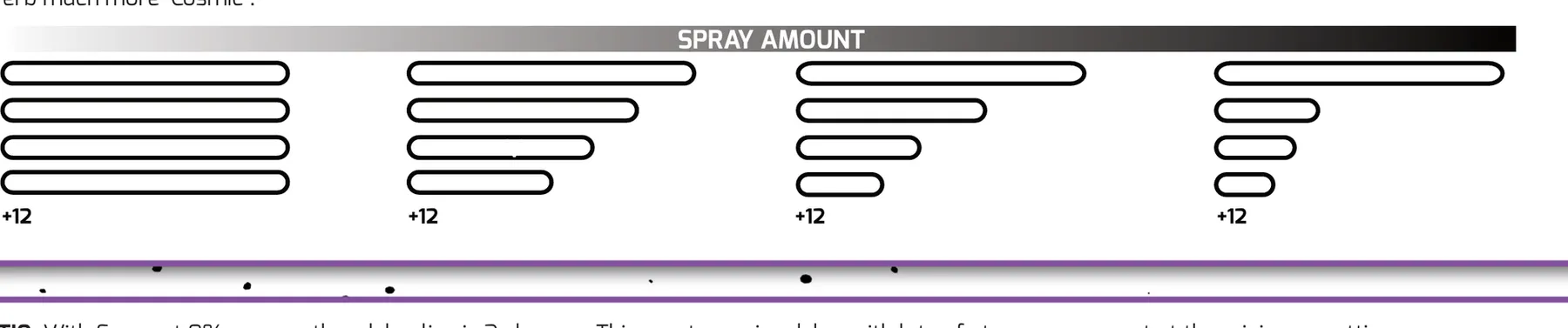
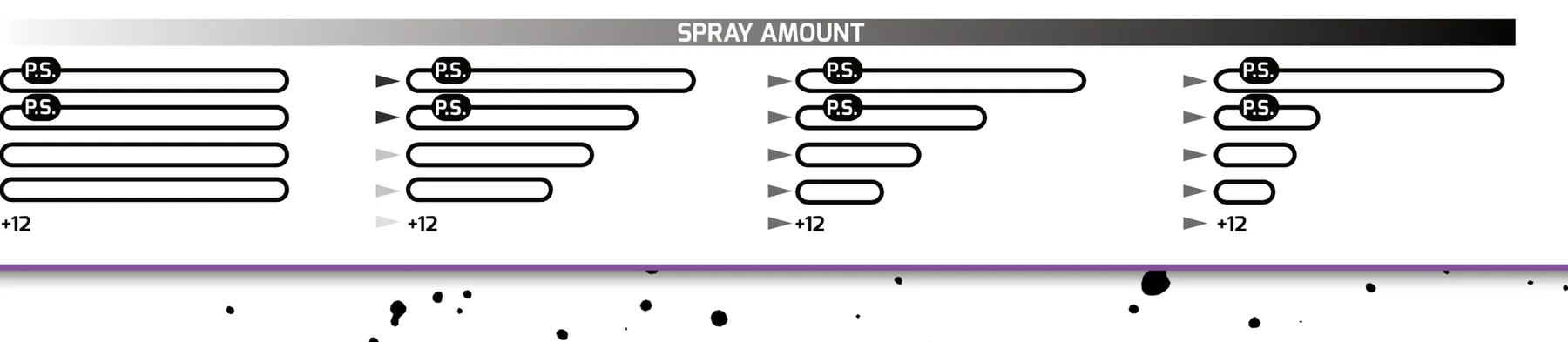
With SPRAY at 0%, all 16 delay lines are the same length. Turning SPRAY clockwise shortens all delay lines but the first, which remains at the current TIME setting. All of the delay lines become different lengths. With faster delay times, SPRAY will go from a traditional delay to a lush reverb very quickly. Add some MOD to add chorusing to the delays and make the reverb much more 'Cosmic'.
4.2RATIO
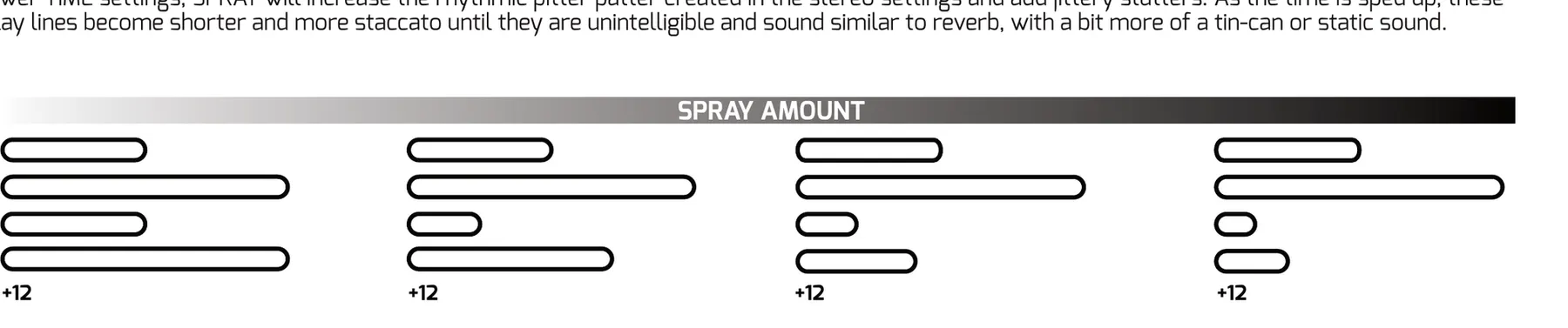
With SPRAY at 0%, every other delay line is 2x longer. This creates a nice delay with lots of stereo movement at the minimum settings. Turning up SPRAY will spread the delay times out to different lengths that are locked into musical ratios of the master delay time or clock setting. With slower TIME settings, SPRAY will increase the rhythmic pitter patter created in the stereo settings and add jittery stutters. As the time is sped up, these delay lines become shorter and more staccato until they are unintelligible and sound similar to reverb, with a bit more of a tin-can or static sound.
4.3WARP
WARP mode is set up very similar to BLUR mode; however, there are pitch shifters placed in the feedback loop of the first two delay lines. WARP FACTOR adjusts the interval for the pitch shifters. WARP FACTOR is quantized to semi-tones and has a range from -1 octave to +1 octave. When the knob is set to 50%, the pitch shifters are off.
At 0% spray, the input signal is fed only into the first two lines, with increased signal level to maintain relatively consistent volume at the final mix out output. As SPRAY is turned from 0% to 50%, the input signal is fed into all the other lines (as per BLUR) with gradual crossfade, i.e. the input into the first two is attenuated and the input into all the others is amplified. At 50% and above, the input is fed equally to all lines.
5Patch Ideas
5.1Karplus-Strong Physical Modeling
With incredibly fast delay times below 1ms, Cosmic Debris can create stunning physical modeling and Karplus-Strong effects. Use a short, plucky sound with a fast envelope as your input, then experiment with the parameters to make them your own.
Leave CLOCK unpatched and press SHIFT + TAP to ensure the module is in FREE time mode, not tracking a clock. Feed a percussive pluck or even a raw trigger signal into the input; shorter input sounds work best because Karplus-Strong synthesis is all about the resonance of the delay itself. Use the default MIX mode (not send mode) for a 100% wet signal. Set all SHIFT controls to their default positions (fully counter-clockwise) except SLEW RATE, which should be set to the fastest slew time, the lowest setting before the LED turns blue indicating crossfade mode. Patch 1V/oct information into the TIME input to sequence the pitch of the delay, and use FEEDBACK to control the decay time of the plucked string sound.
5.2Ambient Reverb and Shimmer Verb
Cosmic Debris can morph from a traditional delay into a lush reverb in seconds. In BLUR and WARP modes, the SPRAY control will wash out the sound into an ambient field of reverb. RATIO mode is worth experimenting with as well for more staccato sounds with slower TIME settings until they become unintelligible and sound similar to reverb.
Match the knob positions using BLUR mode at first. Switch to WARP and set WARP FACTOR at 100% for octave-up shimmers. Start with percussive sounds at the input to dial in the reverb character. Once you have found your sound, introduce slower, more sustained material and let it bloom in the beautiful space you have created. No external CV is required for this patch, but here are some things to try: CV into CENTER, triggers into KILL, and gates into the gate input (set to BLAST mode).
5.3Rhythmic Stereo Delays
Use an external clock or TAP in a tempo for synced delay repeats and short loops that add syncopated rhythms and musical textures to your patch. Increase SCATTER to send delays bouncing between each other, creating playful, evolving interactions across the stereo field.
Start with percussive sounds at the input to dial in the delay character and hear the difference between modes and SCATTER settings. Feed a clock signal into the external input or use the TAP button to tap in a tempo in time with your song. Set TIME somewhere between 12 and 3 o'clock for the most rhythmic syncopations. Start with BLUR mode for the most traditional delay sounds, then experiment with RATIO and WARP modes for different rhythmic patterns and pitch-shifting effects.
5.4Super Saw / Reese Bass
A variation on Karplus-Strong synthesis, this patch transforms a simple saw wave into a massive, rave-ready super saw. Fast TIME settings, short FEEDBACK, along with MOD and SPREAD create quick copies of the incoming waveform, simulating multiple stacked oscillators in unison. Patch 1V/oct into the RATE CV input and the modulation rate will track each note, just like a classic Reese bass.
Using BLUR mode, leave CLOCK unpatched and press SHIFT + TAP to ensure the module is in FREE time mode, not tracking a clock. Adjust the SPREAD control between 25% and 75% to dial in how many copies of the waveform there will be, and adjust MOD to set the amount of detune. Patch the same 1V/oct signal that is controlling your oscillator into the RATE CV input so the modulation is faster with higher notes and slower with lower notes. Keep the filter WIDTH at its widest setting with CENTER at 50% to preserve as many harmonics as possible. Keep MIX at 50% in the default mix mode, but also try increasing it for a more dramatic effect. Try a mono input and a stereo output and play with SPRAY and SCATTER ever so subtly for some strange artifacts.
6Power and Connections
Cosmic Debris features a shrouded, keyed power header to prevent power cables being plugged backwards and is also protected against reverse polarity. In the event a cable is plugged in backwards, no damage will be done; however, the module will not power up.
Plug in a 16 to 10 pin ribbon cable connected to your power supply's bus board into the module with the red strip toward the white line on the rear PCB. Secure the module to your case's rails with the included screws and you are good to go.
USB input is used for initial programming at the factory and for software issues in the field. Upon release, Cosmic Debris is considered finished and no future firmware updates are expected. In the event any bugs are discovered we will distribute an update via WMDevices.com with instructions included in the update file.
7Manual Conventions
KNOBS, BUTTONS, JACKS are all labeled in explanations in all capitals (example: TIME).
SHIFT PARAMETERS are all labeled in explanations in all capitals and in italic font on the panel.
CCW / CW are terms used for 'counter clockwise' and 'clockwise' knob positions and rotations.
0% / 100% are terms for when knob positions are fully CCW or CW.
Hint is a bit of extra information we find helpful with troubleshooting.
Caution is a reminder that a function may cause Cosmic Debris to behave in a way you don't expect right away; again, just notes for troubleshooting.
8Specifications
Dimensions:
- Width: 16 HP
- Height: Eurorack 3U
- Depth: 32mm (with cables)
Power:
- 16 to 10 pin Eurorack standard power cable
- Reverse Polarity Protected
- Red stripe toward -12V
- Typical Power Consumption: +12V: 130mA, -12V: 8mA
CV and Gate Inputs:
- CV and Gate Inputs are 100k ohm impedance
- CV inputs are -5V to +5V
- Gate inputs are 2V threshold Schmitt Trigger
Audio Input/Output:
- Input Impedance: 50k ohm AC Coupled, 0.3Hz HPF
- Input Voltage Range: 21.8 Volts Peak-to-Peak
- Output Impedance: 1k ohm DC Coupled
- Output Voltage Range: 22 Volts Peak-to-Peak
- I/O: 24 bit/48kHz
- Internal Audio: 32 bit float math
- Minimum delay time: 400us
- Throughput Latency: 1.5ms
Regulatory:
- RoHS, CE, & WEEE Compliant
- Made with Lead Free solder and processes.
9More Resources
Visit the Cosmic Debris product page for demos, updates, and support.