
Clutch
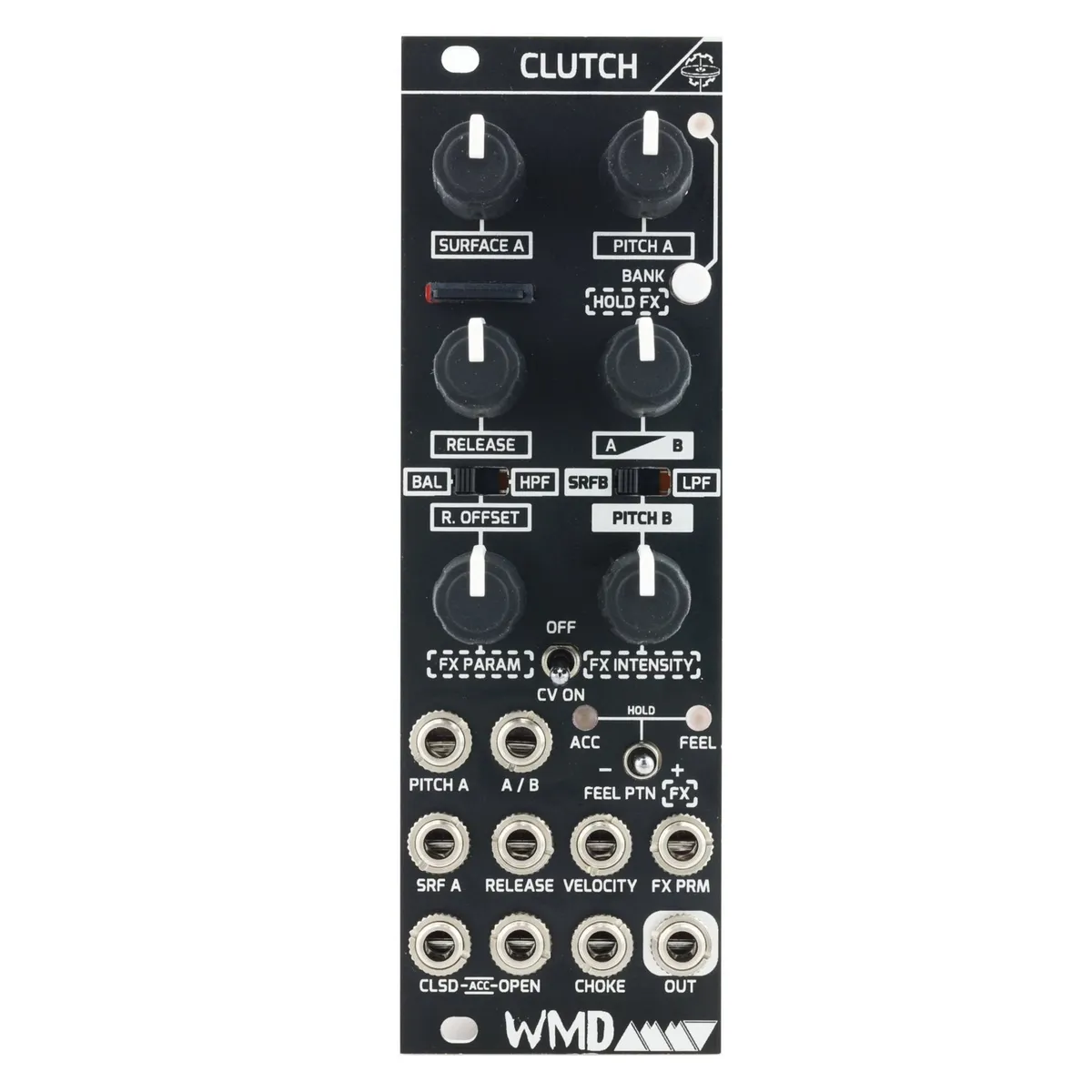
Hi-Hat Percussion Sample Player
1Introduction
Inspired by the machines we electronic musicians know and love, we created Clutch as a dual-layer sample-based percussion module. It is designed to create dynamic and versatile hi-hat sounds with playable immediacy. Built as a tool we wanted in our own rigs, Clutch moves effortlessly between robotic machine rhythms, realistic performances, and experimental percussive textures.
At its core, two sample surfaces — A and B — can be layered, blended, or modulated to produce a wide range of timbres. Surface A offers direct access to pitch and sample selection, while Surface B expands control through a multifunction knob, packing deep features into a compact interface. It starts as the pre-loaded library of professionally recorded acoustic, electronic, and synthesized hits from WMD, and you can load your own samples or get more banks from us.
Samples can be pitched, filtered, and shaped with intuitive controls, then processed through onboard effects. The Feel engine sequences velocity patterns across eight user-editable grooves, bringing human dynamics to static sequences without external modulation.
Clutch is purpose-built to deliver hi-hats you'll actually use — from classic drum machine tones to expressive, evolving percussion that grooves and breathes within your system.
Originally developed under AMMT, a design team formed by Alex Anderson, Mason Malvinni, William Mathewson, and Matt Tanner, Clutch represents the spirit of collaboration and experimentation that defined our time together. Though AMMT was never launched as a standalone brand, the experience of designing this module over three years was a highlight for all of us. We chose to release Clutch under the WMD name, carrying forward the AMMT logo in tribute to the team that brought this instrument (and our older drum modules) to life.
— William Mathewson
2Front Panel Overview
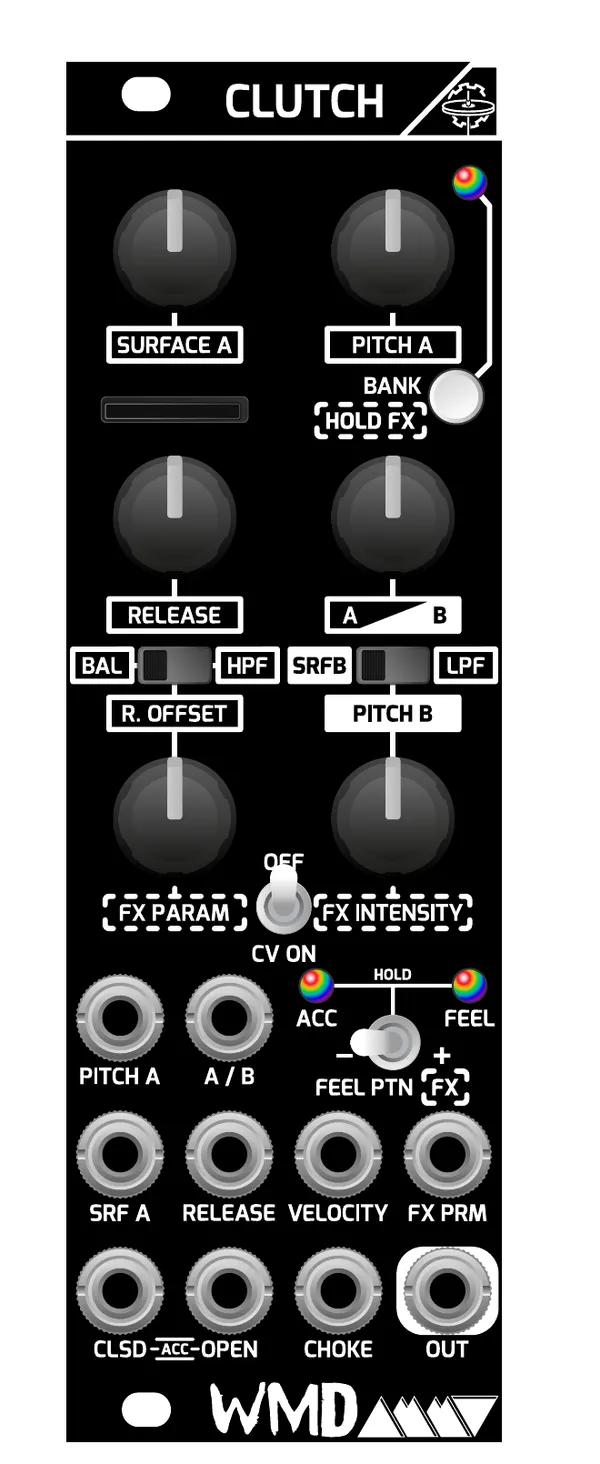
Several controls are dual-function. A switch sits above each multifunction knob and selects which parameter that knob currently controls. Moving any of these switches also disables FX mode so the knob returns to its labeled parameter.
2.1Surface A Controls
- Surface A: Selects which pair of samples will be played from the memory card. Each bank includes up to 16 pairs (1 closed, 1 open) that can be rearranged or replaced via the memory card located below the Surface A knob. The A/B (Blend) control must be set toward A to hear these samples.
- Pitch A: Direct control over the sample rate of the samples in the A set of banks, resulting in pitch changes with interesting character.
- Bank / Hold FX Button: Tap to change Surface A banks. Hold to enter or exit FX mode; hold and use the FX controls for momentary FX, which exits on release. The LED flashes to indicate FX mode is active, showing a color for the selected effect, and the bottom two knobs control FX parameters while flashing. Use the bottom switch to step through FX types. While switching banks, Surface A samples stop playing while Surface B continues to play.
- Release: Controls the length of the sample played back for both open and closed sounds.
2.2Surface B and Blend Controls
- Surface B: Selects which sound is played from Surface B. Surface B is one bank of sounds baked into the module that cannot be replaced.
- Pitch B: Direct control over the sample rate of the samples in the B bank, resulting in pitch changes with interesting character.
- A / B (Blend): Crossfade between the A (memory card) and B (internal) sounds. Use this to mix two samples together, or to quickly transition from one sound to another.
2.3Multifunction Switches
The BAL / HPF and SRFB / LPF switches change the behavior of the knob below each one. Moving either switch disables FX mode and returns the knob to its selected parameter.
- Balance: Controls the volume balance between the Open and Closed sounds.
- Release Offset: Offset ratio of the Release control for the closed sample.
- HPF: A high-pass filter on the output, 100Hz – 14kHz (default).
- LPF: A low-pass filter on the output, 200Hz – 20kHz (default).
2.4Accent and Feel Toggle
Hold the toggle switch to the right to turn Feel on; the active pattern is shown on the Feel LED. Tap right or left to cycle through the different feel patterns. Hold to the left to change accent behavior. When FX mode is enabled, this switch cycles through FX types instead.
Accent LED colors indicate the current behavior:
Feel off — ACC Red: closed accented hit; ACC Cyan: open accented hit.
Feel on — ACC Green: closed hit, reset feel to step zero; ACC Violet: open hit, reset feel to step zero.
3Inputs
- CLSD: Trigger/Gate input for closed hi-hat sounds. Trigger vs. Gate mode can be changed in the HIHAT.INI file; Trigger mode is the default.
- OPEN: Trigger/Gate input for open hi-hat sounds.
- ACCENT: Triggers both CLSD and OPEN at the same time for an accented sound. Also resets the Feel pattern if enabled.
- CHOKE: Quickly damps the currently playing sound with a natural-sounding fast envelope.
- OUT: Audio output for the combined Surface A and Surface B sound.
4CV Inputs and CV On / Off
The CV ON / OFF switch gates incoming CV for the parameters of the top four knobs:
OFF — No CV will reach the parameters of the top four knobs.
ON — CV is enabled for all parameters.
Velocity and FX PARAM can remain active or be disabled via settings in HIHAT.INI; they remain active by default.
- Pitch A (CV): CV control over the Pitch A parameter.
- A / B (CV): CV control over the A/B blend.
- SRF A (CV): CV control over the Surface A sample selection.
- Release (CV): CV control over the Release parameter.
- Velocity: CV level control. -5V to +5V (default); can be set to unipolar in HIHAT.INI.
- FX PRM: CV control over the FX Parameter for the currently selected FX. 0–5V (default); can be set to -5V to +5V in HIHAT.INI.
5Sample Banks
5.1Surface A Banks
The default included sample banks, in LED color order (White, Red, Green, Blue, Orange, Cyan, Violet, Yellow):
| LED Color | Bank | ||
|---|---|---|---|
| White | Classic Drum Machine hi-hats | ||
| Red | Real 1 — Multi-sampled hi-hats | ||
| Green | Real 2 — Different combinations of real hi-hats | ||
| Blue | Real 3 — Different hi-hats with sticks | mallets | and attachments |
| Orange | Techno Shakers | ||
| Cyan | ARP 2600 - 1 | ||
| Violet | ARP 2600 - 2 | ||
| Yellow | LOFI Tape Hats |
Default Surface A sample banks and their LED colors.
5.2Surface B Sounds
- XOX 9
- XOX 7
- Real
- XOX 8.1
- XOX 8.2
- Shaker 1
- Shaker 2
- Tambourine
- Noise Hat
5.3Replacing Samples
You can replace the factory sounds on the memory card with your own samples. File naming and format are critical to ensure Clutch reads your samples correctly. Use .wav files formatted as 16-bit, 48kHz, MONO audio. Get more banks and the originals on WMDEVICES.COM.
Rename your samples using the conventions below, then place them into one of the color-named folders on the card. Do not rename these folders arbitrarily, as Clutch relies on their names to organize and load banks properly. Each folder's name corresponds to the LED color shown when that bank is selected.
Closed hi-hat samples: ##CH.wav (01–16)
Open hi-hat samples: ##OH.wav (01–16)
For example: 01CH.wav, 02CH.wav, 03CH.wav … and 01OH.wav, 02OH.wav, 03OH.wav …
6Effects
Default FX type and color associations:
| LED Color | Effect |
|---|---|
| White | Sputter Distortion |
| Red | Bitcrush Distortion |
| Green | Comb Filter |
| Blue | DJ Filter |
| Orange | Dub Echo |
| Cyan | Chorus |
| Violet | Reverb |
| Yellow | Glitch |
Default FX types and their LED color associations.
7Memory Card
Clutch stores Surface A sample banks, firmware, and global settings on an included memory card. Clutch ships with an 8GB memory card formatted to FAT32. Please use only this memory card: SanDisk SDHC Class 4.
7.1Editing Samples
Sample start points must be trimmed to the beginning transient at a zero crossing. End points should be tastefully edited to not include too much silence. Max sample length is limited by the length of the release envelope set in the HIHAT.INI file (4 seconds default).
Required bit depth: 16 bit
Required sample rate: 48K
Required channels: 1 (mono)
7.2Firmware Update
We do not plan to continuously update this module, as its feature set is complete. However, in the event a firmware update is necessary, replace the CLUTCH.bin file in the root of the memory card with the latest release available on WMDevices.com. Yellow and Orange will flash on the LED until the update is complete.
8Global Settings (HIHAT.INI)
Clutch has a set of global settings and behaviors that can be edited with a text file. To edit these settings, remove the memory card and connect it to your computer. Open the file called HIHAT.INI, located in the root of the memory card's contents.
Any basic text editor will do, such as TextEdit on Mac or a basic text editor on Windows. All information for how to edit this file is included in the file. If you mess the file up, a replacement is available with the latest firmware file.
Prefer not to edit the file by hand? ClutchEdit is a free editor for Mac and Windows that lets you change these settings (and manage your samples) from your computer, with every change reversible until you save. Our thanks to Chris Roberts from Om Ohm Productions for building and sharing this tool with the Clutch community.
8.1Colorblind Accessibility
Banks, FX, and Feel modes are represented by colored LEDs. To improve accessibility and streamline navigation, these color assignments can be customized. Users can reorganize or remap colors for each mode, exclude specific color FX selections, and remove sample bank folders with difficult-to-see colors. This allows colorblind users to tailor Clutch's visual feedback to the colors they can distinguish, while creating a more intuitive and focused workflow for all users.
9Patching Tips
Here are a few helpful tips on how to use Clutch and what features you should really get to know in order to get the most out of the module.
CV Disable: This feature is helpful when you want to adjust parameters but have CV plugged into the jacks. Start fresh without re-patching by flipping the switch up to disable all incoming CV. This is also a fun performance tool, as you can quickly switch on the modulation for some crazy effects, then quickly disable it to go back to the current knob settings.
A/B Blend: Utilize this control with your hands. Send a bunch of CV modulation to Surface A and Pitch A to get some wild effects on the A side. Experiment with using this knob to snap back to Surface B sounds, which are the more bread-and-butter sounds and are not affected by CV. Slowly introduce Surface A or cut to it quickly with this knob, but remember Surface B is always there for a solid backbone or reset.
Feel: The Feel control adds a layer of velocity and groove to your sequence. We recommend starting with a pattern of 16th notes into the Closed trigger input. Then experiment with resetting the sequence pattern and triggering an accent by sending triggers to both open and closed at the same time. You can change which sound is triggered on an accented hit by holding the bottom switch to the left. This gives you further control over the groove Feel creates.
Accent: Again, start with just 16th notes into the closed trigger input. Disable the Feel control by holding the bottom switch to the right. Next, add accents in places for a quick groove without too much external CV control. Remember you can change what sound triggers on an accented hit by holding the bottom switch to the left.
Try different Surface A banks: We have included a wide range of sounds in the sample banks. Check them all out and experiment with CV into the Surface A input to see what kind of variety you can achieve. We've got banks of multisamples for more realistic-sounding hi-hats, as well as some more synthy bleeps and bloops that sound really wild when the Surface A selection is modulated. These sounds are great for adding a unique static texture to the hi-hat sound, as well as making some synthy pitter-patter under your bread-and-butter sounds for interesting layers in your productions.
Add your own samples: Try replacing our banks with sounds of your own for a sound that is unique to you. We love our banks, and as useful as some of them are, they are really there to show what can be made with a wide variety of samples and to inspire you to add your own sounds beyond just the traditional hi-hat. Make sure to use the right naming convention and 48kHz 16-bit wavs.
Customize the interface: Sample banks can have up to 16 sample pairs; however, if you'd like fewer samples for easier access, the knob will automatically scale to the number of pairs present. The same goes for banks and effects. Exclude banks by deleting folders on the SD card for a more focused selection. FX can also be assigned to specific colors, and colors can be disabled for a more streamlined experience.
10Specifications
Dimensions:
- Width: 8HP
- Depth: 38mm (with cables)
Power:
- +82mA
- -17mA
Inputs:
- CV and Gate inputs are 100kΩ impedance
- CV inputs sum with knobs. Full sweep is 5V
- Gate Threshold: 2V Schmitt Trigger
Outputs:
- Audio Output: 470Ω impedance, 20 Vpp range
- 2.0ms latency maximum
Engine:
- Sample Format: 48 kHz / 16 bit / Mono
- Resampling: 4 point spline
- Resampling rate range: 0.001 - 3.7
- Editable HIHAT.INI for tweaks
- Saves settings after 1 minute
Revisions:
- Manual Revision: 1.02
- Firmware Revision: 1.00
11More Banks and Resources
Get more sample banks and the original sounds, plus firmware files and support, on the WMD website.