
ARPITECHT
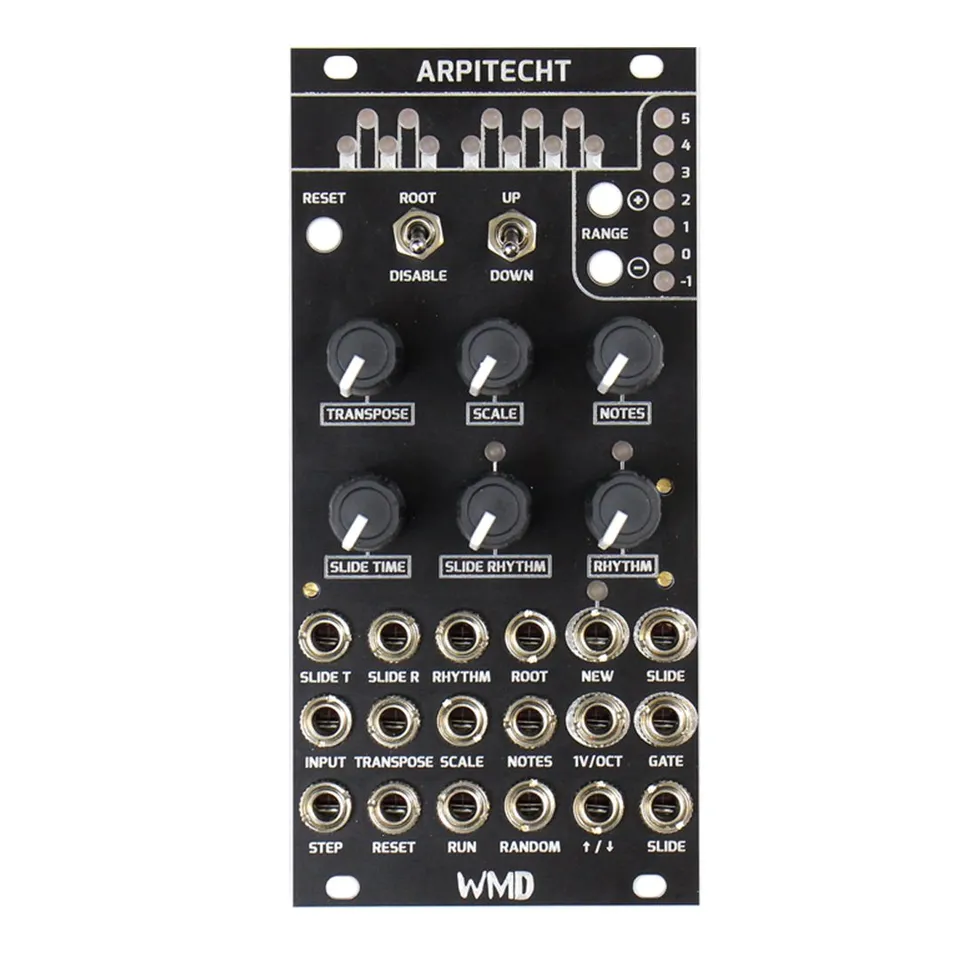
Rhythmic Arpeggio Generator and Quantizer
1Introduction
The Arpitecht started as a quantizer that used only CV to determine scales and notes. Immediately, it was super playable and fun to explore. But tying up a lane just for sequencing/quantizing seemed like a waste of good space.
I added a clock input so the Arpitecht could step through its own notes. This let us do nice changes with that same single-lane sequencer, running slower. The concept for the base module was 95% done on the first prototype. Refinement took eight more revisions.
Coding and revisions took the better part of a year as I wrote and re-wrote parts of the firmware to be faster and as I subtly improved the interface. A couple full re-starts took place as well.
Then, once it was nearly done, I heard, "What if it could do chords?" from the design room. Fortunately there was a single ADC input left, and the Triad came to be after a few prototypes and lots of coding.
Once the first bit of code was running on the Arpitecht, it was instant fun. Now that it's finished, it's instant techno, or avant garde jazz, or chip-tune trill chords.
Thank you for purchasing an Arpitecht, I hope you enjoy it as much as we do.
2Controls and Connections
2.1Controls
- RESET:
- This button, whose function is also accessible through the RESET input, returns the sequence to the first step of the arpeggio.
- ROOT ENABLE:
- This switch disables the root note of the scale. The jack is normaled high, and the root switch will invert the CV when down.
- DIRECTION:
- Change the direction of the arpeggiation here. The middle position of the switch is UP and DOWN. When the CV jack is used, the switch is disabled, and direction is directly controlled by the voltage on the jack — high for UP, low for DOWN.
- RANGE:
- The two RANGE buttons select the overall octave spread of the arpeggiation or quantized CV, while the accompanying LEDs display the current position (blue) and range (red).
- TRANSPOSE:
- In the middle position, this knob is at 0; clockwise transposes up to +12 semitones, and counter-clockwise transposes -12 semitones. 1V/Oct, -1V to +1V.
- SCALE:
- Selects between 16 different scales, beginning with major and ending (all the way clockwise) with chromatic.
- NOTES:
- The Arpitecht features 64 note masks that allow you to select which notes in the scale will be incorporated into the arpeggiation.
- SLIDE TIME:
- Controls the rate of the analog slide circuit when triggered by either the internal SLIDE RHYTHM or the SLIDE input.
- SLIDE RHYTHM:
- Like RHYTHM, this knob allows you to apply one of 32 automatic slide rhythms to your sequence. Instant acid.
- RHYTHM:
- The RHYTHM knob selects between 32 built-in gate sequences. Together with SLIDE RHYTHM, a world of rhythmic variation is right at your fingertips.
2.2Inputs and Outputs
- INPUT:
- Quantize CV signals by plugging in here. This also serves as the arpeggio start note. Changing the voltage here alters the note at which the arpeggio begins, and resets step to zero. 0–5 Volts.
- STEP:
- A pulse here will advance the arpeggio to the next step.
- RUN:
- This input allows the step input to advance. It is normaled high.
- RANDOM:
- When high, the next step will be randomized within the scale, mask, and range.
- 1V/OCT OUT:
- -1 to 6V compensated / buffered output.
- NEW OUT:
- The NEW output delivers a trigger every time the note changes.
- GATE OUT:
- Output that combines the RHYTHM pattern, pulse width of the STEP input, and held SLIDE gates.
- SLIDE OUT:
- Gate for when a slide is active from SLIDE RHYTHM or the SLIDE input.
3Scales
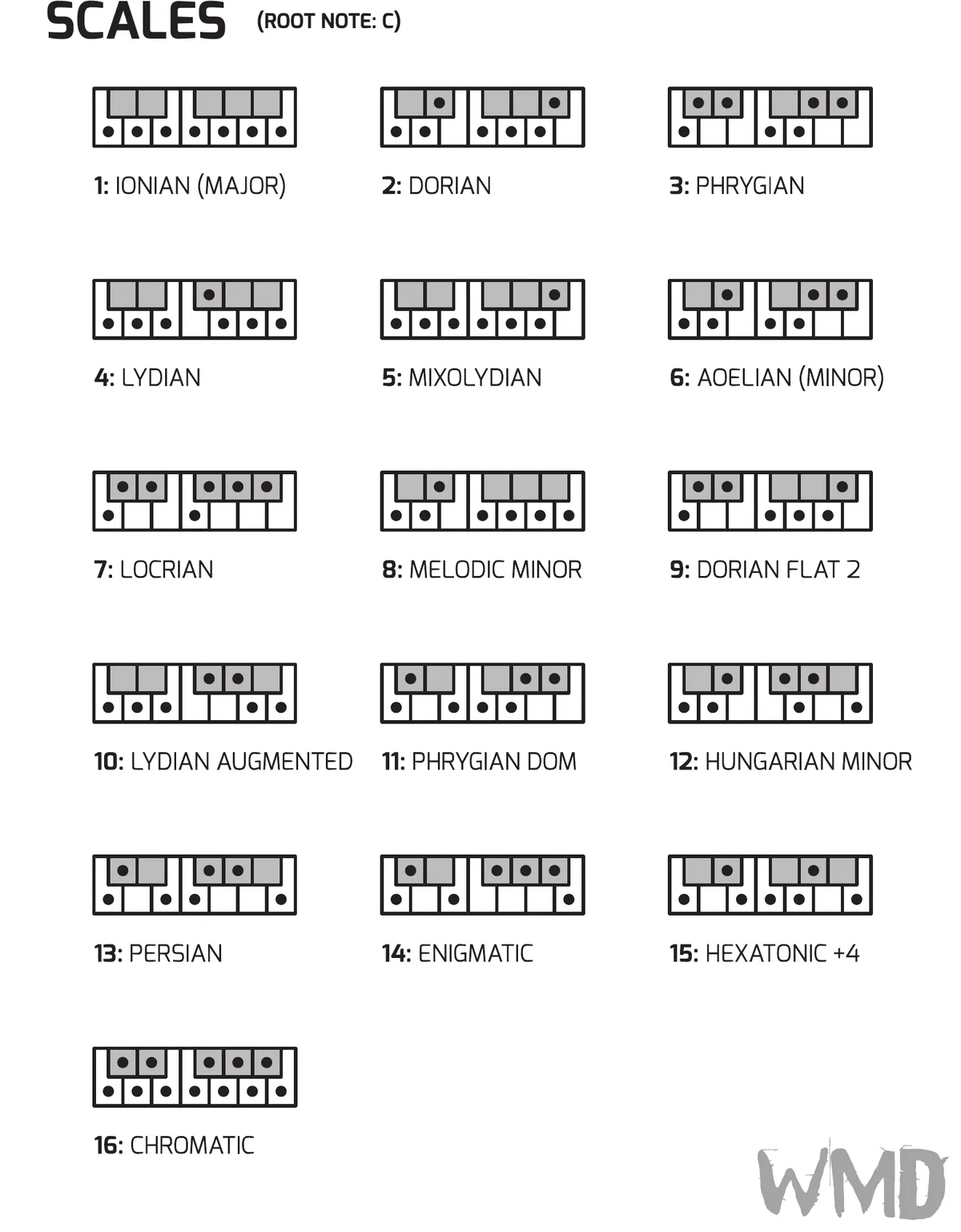
The SCALE knob selects between 16 scales, in selection order from fully counter-clockwise to fully clockwise. The diagrams below show which notes of a one-octave keyboard each scale includes, relative to a root note of C; the table that follows lists the scales by their selection number.
| # | Scale |
|---|---|
| 1 | Ionian (Major) |
| 2 | Dorian |
| 3 | Phrygian |
| 4 | Lydian |
| 5 | Mixolydian |
| 6 | Aeolian (Minor) |
| 7 | Locrian |
| 8 | Melodic Minor |
| 9 | Dorian Flat 2 |
| 10 | Lydian Augmented |
| 11 | Phrygian Dominant |
| 12 | Hungarian Minor |
| 13 | Persian |
| 14 | Enigmatic |
| 15 | Hexatonic +4 |
| 16 | Chromatic |
Arpitecht selectable scales (root note C)
4Rhythm and Slide Patterns
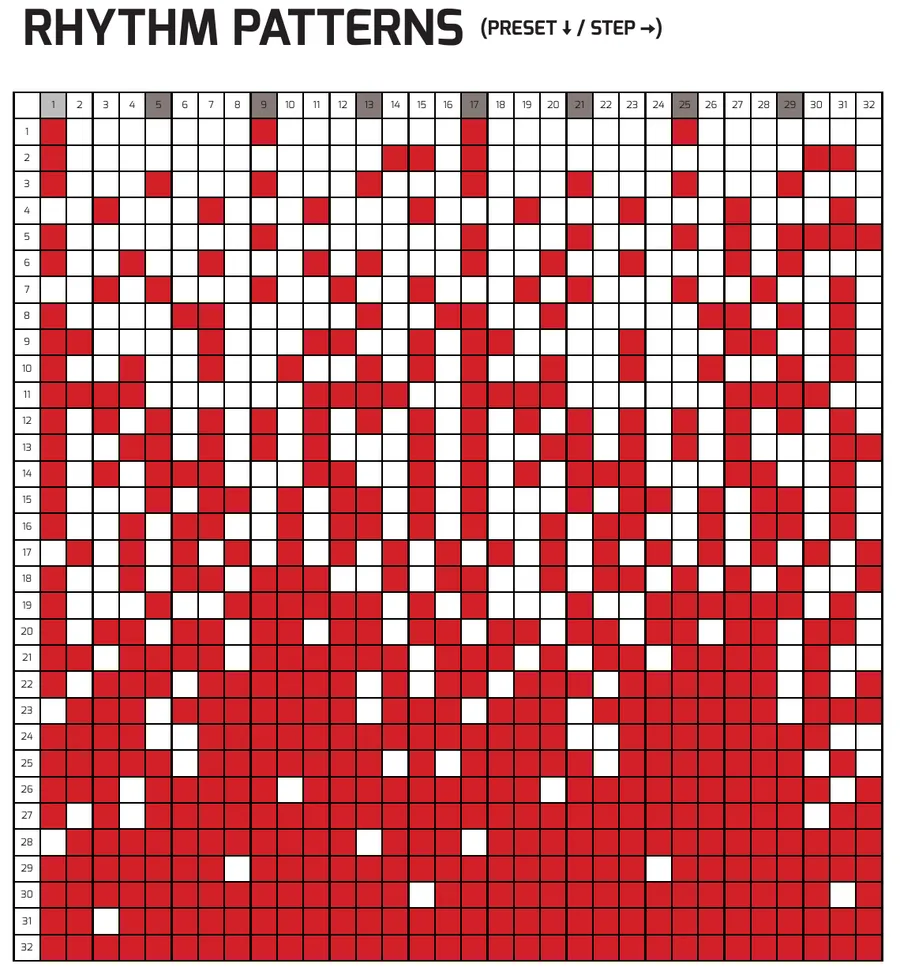
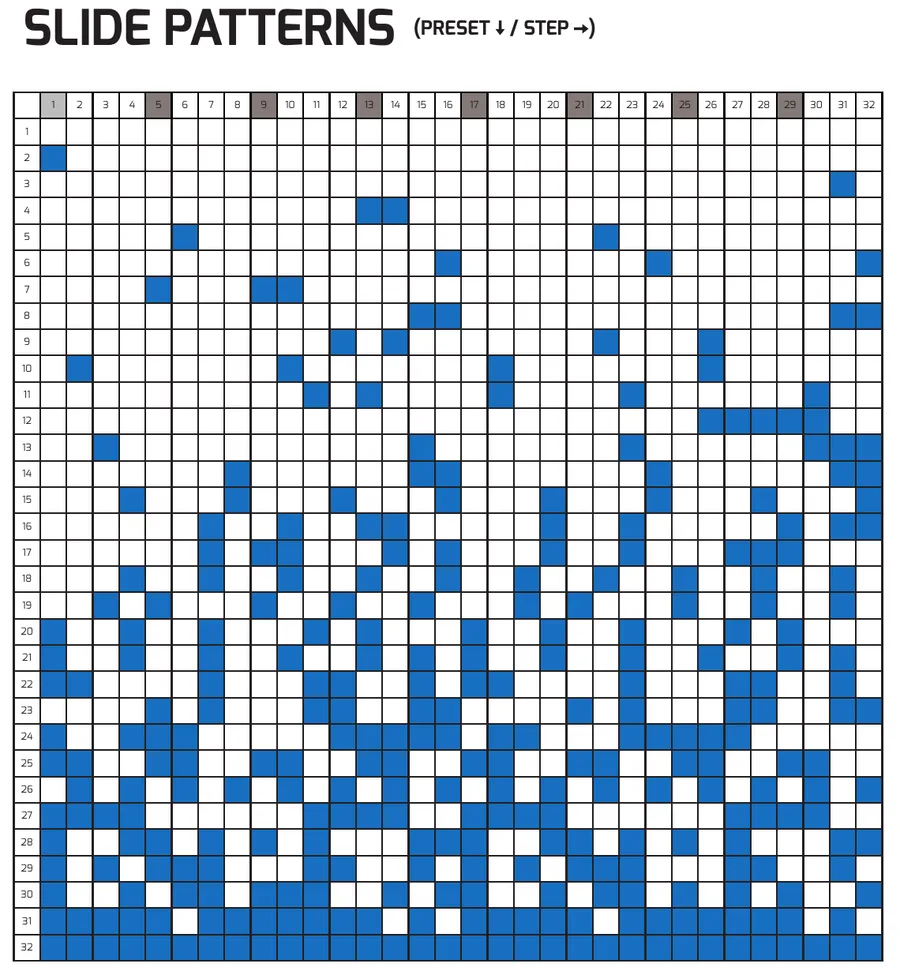
The RHYTHM and SLIDE RHYTHM knobs each select from 32 built-in preset patterns. In the charts below, each row is a preset (1–32) and each column is a step (1–32); a filled cell marks an active step.
4.1Rhythm Patterns
4.2Slide Patterns
5Triad Expander
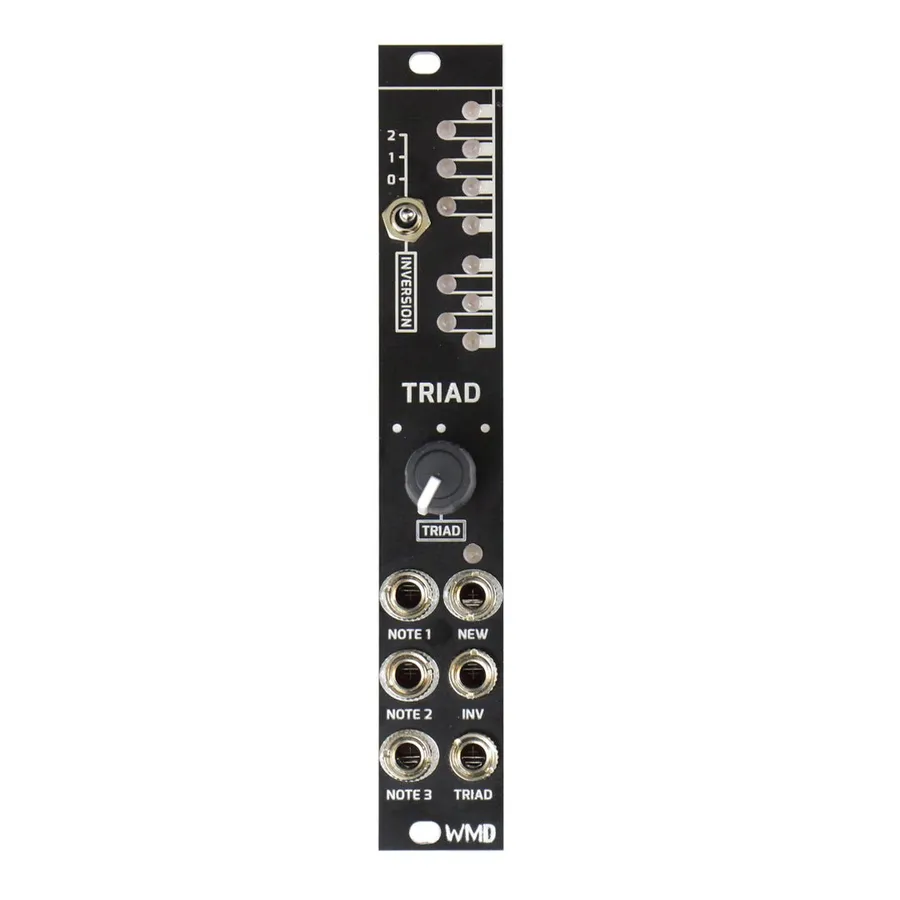
Triad is the separately available expander for the Arpitecht. It selects a group of three notes (a chord) from the active scale and presents each note on its own buffered CV output, following the Scale and Transpose settings on the Arpitecht. Ignore this section if you do not have Triad.
5.1Triad Controls
- INVERSION:
- Transposes the lowest note up an octave. 0: no transposition. 1: transpose note 1. 2: transpose notes 1 and 2.
- TRIAD:
- CV / knob for selecting the group of three notes from the scale. Follows Scale and Transpose on the Arpitecht.
- NOTE 1–3:
- Buffered CV outputs for each note in the triad. NOTE 1 is the lowest note from the display; NOTE 3 is the highest.
- NEW:
- Trigger output when the TRIAD is changed. No trigger for inversion changes.
5.2Connecting Triad
Connect Triad to the Arpitecht using the keyed expander header on the rear of each module and the included expander cable. Orient the cable so the red stripe matches the marking on the header.
6Specs
Dimensions:
- Depth: 30mm (with cables)
Power:
- Arpitecht: +70mA, -35mA
- With Triad: +84mA, -48mA
CV Inputs:
- Impedance: 100kΩ
- Input Range: 0–5V (Transpose: ±1V)
- CV inputs sum with knobs; full sweep is 5V
CV Outputs:
- Buffered, 100Ω impedance (including Triad)
- Automatic load compensation
- Output Range: -1 to 6V, 14-bit
- Triad Note Output Range: 0–4V, 12-bit
Gates and Logic:
- Gate Inputs: 50kΩ impedance
- Gate / Logic Inputs: 2V threshold Schmitt trigger
- Gate Outputs: 10V, 470Ω impedance
- Inversion CV Input Thresholds: 1.25V and 2.5V
Firmware:
- Firmware upgradeable via USB